A control script runs on a local client and coordinates work across remote computers. It establishes remote connections, tells each target to run a script or command, and gathers returned information in one place. Keep the remotely executed task separate from the controller so the same control logic can invoke different scripts. section 5.2 section 5.2.2
Build a reusable control script around these responsibilities:
- Start with a target-server list and paths for the remote script, collected results, and connection-error output. section 5.3.3
- Create persistent sessions with New-PSSession before invoking work. Reusing established sessions lets commands run across successful targets together and avoids serial foreach execution. section 5.2.2 section 5.3.3
- Add only successful sessions to the invocation array. Wrap connection creation in try/catch with -ErrorAction Stop so an unreachable machine is isolated rather than preventing all remote commands. section 5.3.3
- Pass the session array to Invoke-Command. Use a local script file for complex reusable work, or a script block for short commands. section 5.3.3
- Test connection count, memory, bandwidth, and returned-data volume before raising concurrency. Persistent connections default to 32 per PowerShell session, while a useful limit depends on the workload. section 5.2.2
Collect VS Code extensions from several servers
A controller can create sessions for Svr01, Svr02, and Svr03, invoke a locally accessible Get-VSCodeExtensions.ps1 through Invoke-Command, and collect results into CSV data. Importing prior CSV results can remove already processed computers; failed session creation is recorded separately while reachable servers continue. section 5.3.3
Figure 5.1 Control scripts are used to execute a PowerShell script or script block across multiple machines and return the data to a single place.
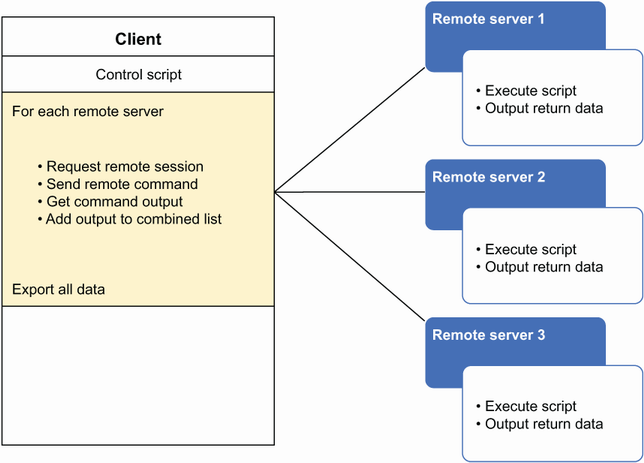
Shows the control-plane pattern: one local script dispatches a PowerShell script or script block to multiple machines and returns their data centrally. section 5.2
Choose the remoting protocol for the environment. WSMan suits Windows Active Directory environments; SSH remoting is needed for non-Active Directory, Linux, or macOS environments. A control script can combine remoting protocols, but agent-based remoting does not provide this central controller pattern. section 5.8
