Agent-based remoting runs a PowerShell script on a target device through locally installed software rather than a direct remoting connection. Third-party platforms such as Jenkins nodes, Azure Automation Hybrid Runbook Workers, HPE Operations Agents, and System Center Orchestrator Runbook Workers commonly provide this execution layer. section 5.6
The agent typically handles permissions and authentication, reducing the connection work required by PowerShell remoting. The design tradeoff is the absence of a control script: scripts must return collected data and record actions or results themselves. section 5.6
Adapt scripts for agent execution by:
- Writing output to a centralized destination such as a domain file share, FTP site, or cloud storage. section 5.6
- Logging execution and results even when the script performs an action instead of collecting information. section 5.6
- Protecting centralized writes from conflicts when multiple machines run the script simultaneously. section 5.6
Collecting VS Code extensions
A remote agent can search user-level VS Code extension directories for .vsixmanifest files, extract extension metadata, and export the results to a predetermined CSV on a network share. This approach supports fleet-wide discovery when system-level scanning tools miss per-user installations. section 5.0 section 5.6
Figure 5.10 Example workflow for collecting data returned by remote agent executions to a central location
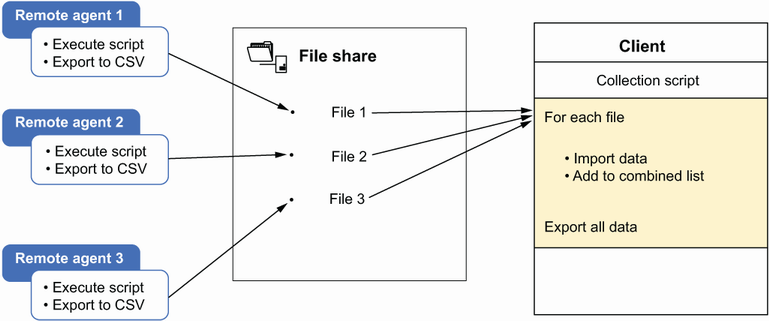
Follow the workflow for collecting results from multiple agent executions into one protected central location. section 5.6
