A controlled form keeps its input values in React state rather than leaving the browser to manage them. Each input receives its current value from state and reports edits through an onChange handler. Updating state confirms the edit and displays the new value; without that update, the entered change is ignored. section 9.0 section 9.2
Add two numbers
import { useState } from "react"; function Sum() { const [first, setFirst] = useState(0); const [second, setSecond] = useState(0); return ( <form> <label>A: <input type="number" value={first} onChange={(evt) => setFirst(evt.target.valueAsNumber)} /></label> <label>B: <input type="number" value={second} onChange={(evt) => setSecond(evt.target.valueAsNumber)} /></label> <div>A+B: {first + second}</div> </form> ); } Both inputs read from state. Each change handler writes the entered number back to state, and the displayed sum uses those same values. section 9.2
Choose controlled inputs when the application must validate, filter, or modify a value while someone types. An uncontrolled input can still have an initial value, but React does not control subsequent edits. It takes less form-handling code when that control is unnecessary. File inputs must be uncontrolled. section 9.1 section 9.6
State can also respond to a parent-provided value: an email input can copy a changed value prop into its local state with an effect, while its onChange handler continues to capture typing. As practice, a timer setup form can use either controlled or uncontrolled inputs to collect a custom starting time. section 6.1.4 section 12.3
Figure 9.2 The flow of data in controlled versus uncontrolled inputs differs in the fact that React doesn’t control the value after the input has been rendered. Action 5.a highlights React’s control over the input even after the user interacts with it—React can intercept updates and change them on the fly or even ignore them. In the uncontrolled input on the bottom, React has no such control, and whatever the user enters will be displayed in the input.
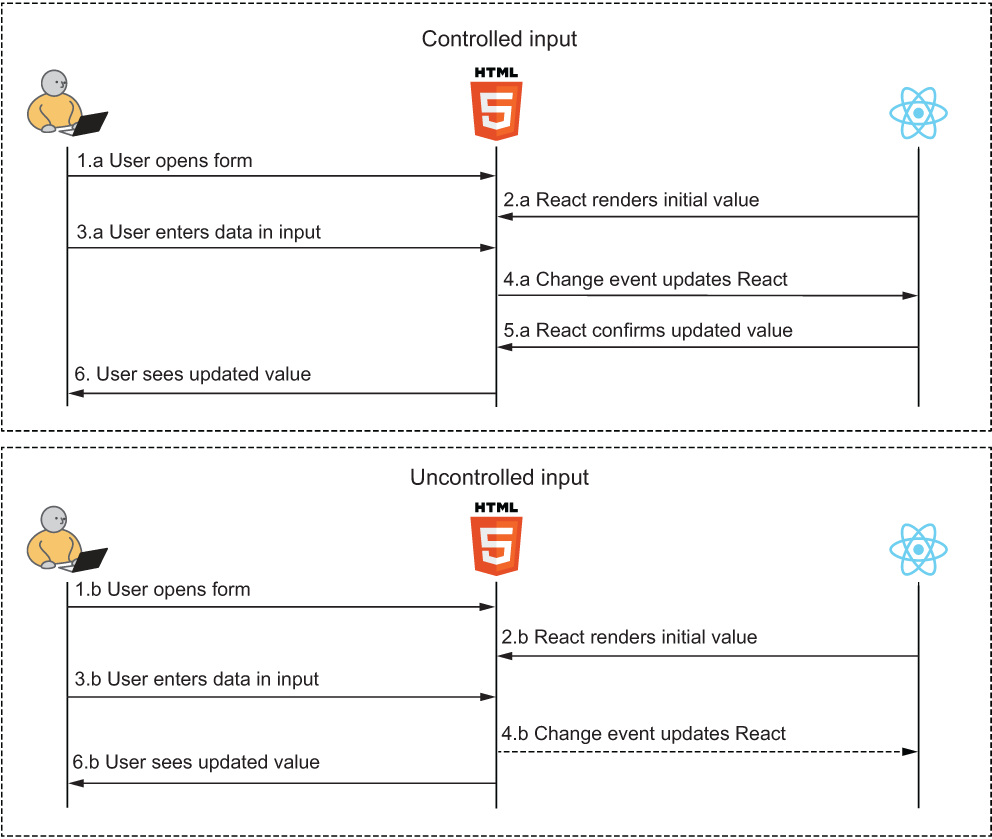
The diagram contrasts React’s ability to update a controlled value after typing with the browser-managed value of an uncontrolled input. section 9.1
