onChange is a React event-handler property that receives input changes. Its callback reads the new value and usually updates state, allowing JSX to confirm the value back to the field. section 9.2 section 9.6
Use onChange with the input behavior you need:
- Pair value and onChange on controlled inputs. Update the state during every change; otherwise, user-entered information is ignored. section 9.2
- Read number inputs with evt.target.valueAsNumber, then calculate directly from the resulting state. section 9.2
- Filter the complete new input value rather than one character, because users can paste or otherwise enter multiple characters. section 9.2.1
- Format and limit values inside onChange for masked fields, but expect edge cases such as awkward Backspace behavior. section 9.2.2
- Read checkbox state through evt.target.checked rather than evt.target.value. section 9.5
Controlled numeric inputs
const [first, setFirst] = useState(0);\nconst [second, setSecond] = useState(0);\n\nconst onChangeFirst = (evt) =>\n setFirst(evt.target.valueAsNumber);\n\n<input\n type="number"\n value={first}\n onChange={onChangeFirst}\n/>\n\n<div>A+B: {first + second}</div>\n\nThe handler converts the input to a number and stores it. React then renders the current state through value, keeping the input controlled and the sum live. section 9.2
Figure 9.3 The desired output JSX for our calculator contains two inputs. Note how we pass two specific properties to both inputs: value and onChange.
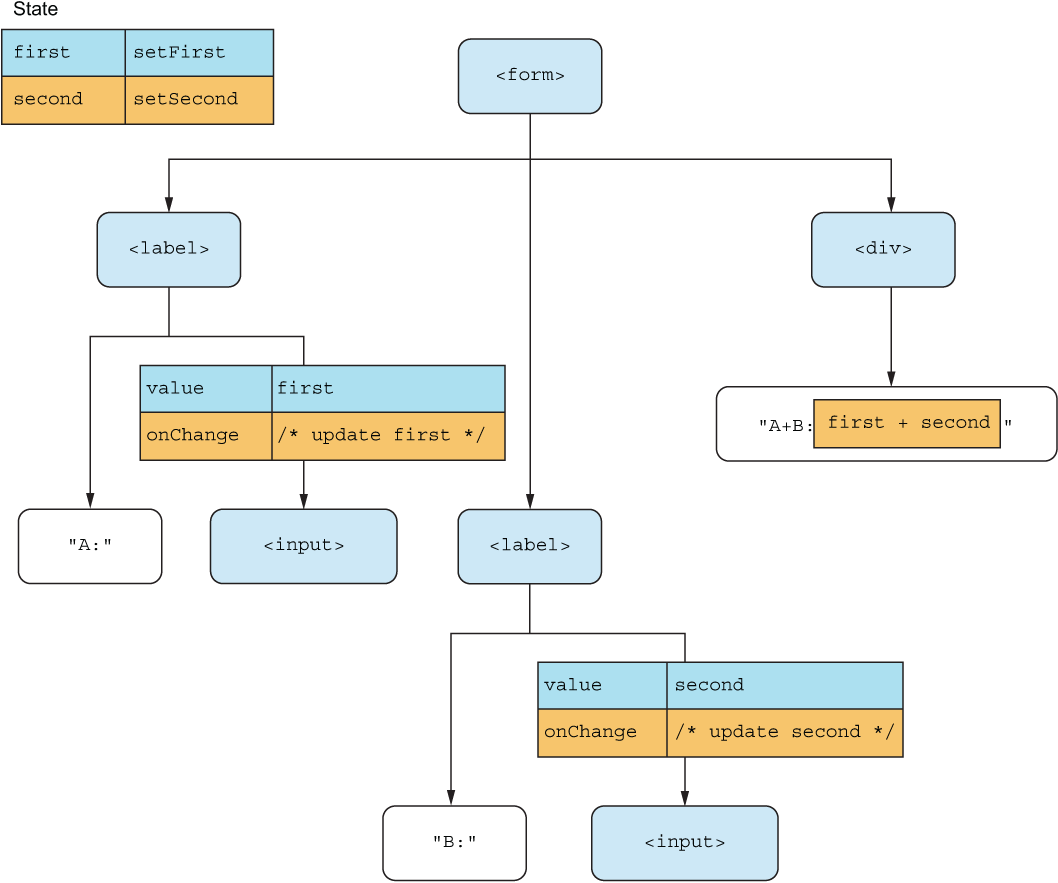
Inspect the calculator JSX to see value and onChange paired on both controlled inputs. section 9.2
