A cooling schedule controls how temperature falls during simulated annealing. Temperature determines how readily the search accepts a worse solution: high temperatures encourage exploration, while low temperatures favor improving moves. Cooling gradually gives the search a chance to move beyond local minima before it settles into more selective search. section 5.2.4 section 5.7
Configure the schedule with four linked choices:
- Starting temperature: too high makes almost every move acceptable; too low makes the search behave like local search. When the scale of objective-function changes is unknown, start high and lower the temperature until roughly 50%–60% of worse moves are accepted. section 5.2.4
- Temperature decrement: choose how temperature falls. Available implementations include linear, geometric, logarithmic, exponential, and linear-inverse schedules. section 5.2.4 section 5.3
- Iterations per temperature and final temperature: decide how long to search at each setting and when cooling stops. section 5.2.4
Figure 5.8 Different SA cooling schedules
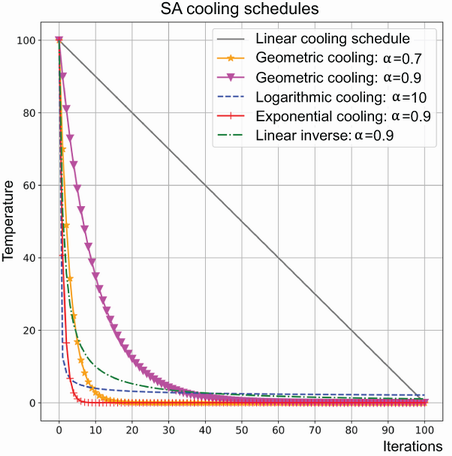
Compare the shapes of the available cooling schedules before choosing one to test. section 5.2.4
Tune a route search
A Berlin52 traveling-salesperson run uses linear cooling, an initial temperature of 150, a final temperature of 0.01, and 500 iterations per temperature. For a smaller five-city problem, an optalgotools SimulatedAnnealing run instead sets cooling_schedule='linear_inverse'. These are configurations to test, not universal settings. section 5.5
Treat the schedule as a problem-dependent tuning choice. Try different starting temperatures and schedules, then compare solution quality and run time. If progress stalls, reheating or changing schedules between search phases are possible adaptations. A well-tuned schedule can help find an acceptable solution, but simulated annealing does not guarantee feasibility or optimality. section 5.2.5 section 5.6
