Cowork is a Claude Desktop feature for working with local files and connected services. The model reasons in the cloud, while a permissioned sandbox on your machine runs commands and reads or writes files in accessible folders. This avoids repeated uploads and downloads when a project accumulates documents. section 3.0 section 3.1
Figure 3.1 The model stays in the cloud while Cowork runs a sandbox on your machine
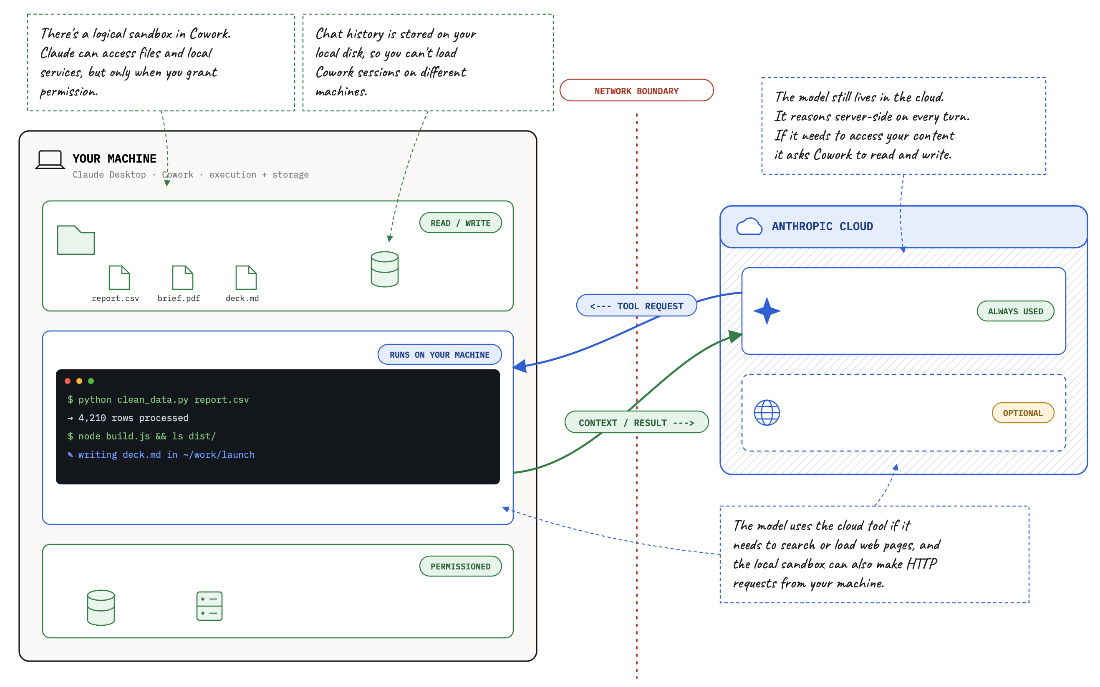
The model remains in the cloud while Cowork runs tools in a local sandbox. section 3.1
A Cowork task is a turn-by-turn conversation that can search accessible folders, select inputs and write outputs. Unlike regular chats, task history stays on the machine and does not follow you between computers. section 3.1
Read and write a local summary
Start a Cowork task and ask: “How many files do I have in my Downloads folder?” Grant access when prompted, then ask: “Create summary.md in Downloads summarizing file count, storage used, and earliest and latest files.” The operating system may separately request permission to write. For ongoing work, prefer a dedicated task folder over a broad folder such as Downloads, and review the resulting file. section 3.2
Extend the workflow as needed:
- Use a Cowork Project to bundle instructions, folders and tasks. If its folder is a Git repository, review changes with git diff and roll back mistakes. section 3.9
- Connect an external service through an MCP connector. Authenticate with the service and review the requested permissions; connector write actions can require approval. section 3.5
- Create a Cowork live artifact for a refreshed view of connector data. An email dashboard, for example, can query Gmail when opened; check its results, since different runs can produce different classifications or an empty chart. section 3.6
