liveBook · Manning

Cowork project

As explained in Claude at Work

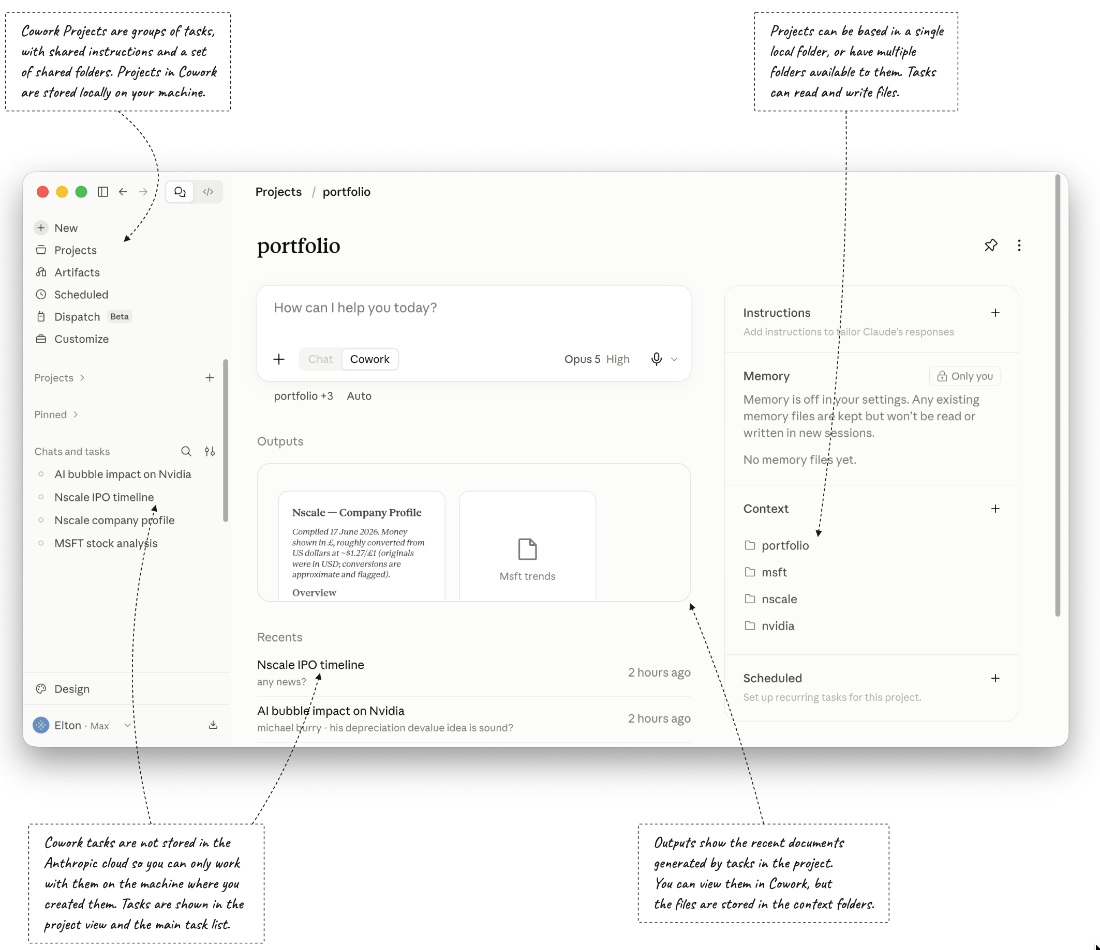
A Cowork Project is a Claude Desktop project configuration that gives Claude access to a selected local folder and its contents.

A Cowork Project groups tasks around instructions and folders on your machine. Claude can read and write those files directly, including across folders in different locations. Projects are tied to one machine. section 3.4

Use a local Git repository to keep review and recovery in your hands:

  • Ask Claude to work on project files, then inspect its changes with git diff before deciding what to commit. section 3.4
  • If a change is wrong, use Git history to restore an earlier version. section 3.4

Set up a design repository

Prompt Claude to copy design documents into a project folder, initialize it as a Git repository, update the documents to use Python instead of .NET, review them for correctness, and commit the changes. section 3.8

Figure 3.6 A Cowork Project can span folders from anywhere on your disk
CH03 F06 Stoneman

A Cowork Project can draw on folders from different locations on the same disk. section 3.4

How Claude at Work covers it

How deep it goes
Explains folder access, machine-local scope, and Git-based review and rollback, without detailing the setup interface.
Examples
Uses research and portfolio folders, then demonstrates revising design documents and committing them in a Git repository.
What it assumes
Uses local folders as inputs and treats a Git repository as an optional way to review and recover changes.
What you can do after
Configure a project over local folders, delegate file changes, and review or revert those changes with Git.
How it connects
Connects local folders with Git repositories and can share an application codebase with Claude Code.

Related concepts

This explainer was generated by Manning's knowledge graph from the text of Claude at Work. The section links point to the parts of the book it draws on.