liveBook · Manning

Cross-platform development

As explained in Learn Docker in a Month of Lunches, Second Edition

Multi-platform support is the ability of software or its delivery process to operate across multiple operating-system and processor platforms.

Cross-platform development keeps software, container images, and delivery workflows usable across operating systems and processor architectures. Plan for platform changes early, even when current deployments need only one variant. section 12.5 section 16.2

Make Dockerfiles easier to move between platforms with these rules:

  • Use multi-platform images in every FROM instruction. section 12.5
  • Avoid operating-system-specific commands in RUN and CMD instructions. section 12.5
  • Put complex startup or deployment logic in a cross-platform utility, or install a cross-platform shell such as PowerShell. section 12.5
  • Choose base images and build services that cover the operating systems and architectures you actually need. section 12.5

A two-platform staging pipeline

A PowerShell build script can produce Linux images on Linux and Windows images on Windows. GitHub Actions runs separate Linux and Windows workflows: the Windows run starts only after Linux succeeds, then both publish staging images with platform-specific tags. section 16.2

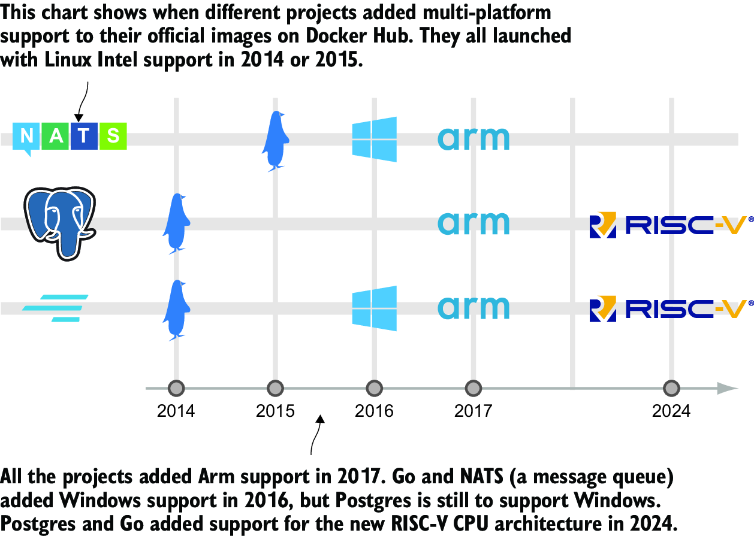
Figure 12.15 Projects typically launch with Linux Intel support and add variants as they become popular.
figure

Trace how a project can begin with Linux Intel support and add platform variants as users, developers, or operating costs create demand. section 12.5


How Learn Docker in a Month of Lunches, Second Edition covers it

How deep it goes
Explains Dockerfile rules, build-service trade-offs, workflow sequencing, image tagging, and local verification without detailing platform internals.
Examples
Uses Linux and Windows images, Intel and Arm architectures, staged workflows, platform-specific tags, and GitHub Container Registry pulls.
What it assumes
Assumes familiarity with Dockerfiles, container images, shell scripts, Git workflows, and basic CI/CD configuration.
What you can do after
Build it from scratch with portable Dockerfiles and automate staged Linux and Windows image builds through GitHub Actions.
How it connects
Connects Dockerfiles, multi-platform images, Docker Buildx, CI/CD pipelines, GitHub Actions, PowerShell, and container registries.

Also explained in

Compare how 2 books explain cross-platform development →

Related concepts

This explainer was generated by Manning's knowledge graph from the text of Learn Docker in a Month of Lunches, Second Edition. The section links point to the parts of the book it draws on.