Cross-site request forgery (CSRF) lets a malicious website submit a request to another site as though it came from a logged-in user. It matters especially when authentication uses cookies: the browser sends the destination site’s cookies with a form POST, even when the form came from an unrelated site. section 29.2
A forged bank transfer
A user logs in to a banking site, then visits an attacker-controlled site. That site submits a form matching the bank’s transfer form. The browser includes the bank’s authentication cookie, so requiring a login alone does not reveal that the user never intended the transfer. section 29.2
Antiforgery tokens provide an additional check. A legitimate form contains a hidden token, while a related token is stored in a cookie. The browser can send the cookie during a forged POST, but the malicious site cannot reproduce the form’s hidden token. Validation rejects the request when the tokens do not match. section 29.5
Figure 29.5 Protecting against a CSRF attack using antiforgery tokens. The browser automatically forwards the cookie token, but the malicious site can’t read it and so can’t include a token in the form. The app rejects the malicious request because the tokens don’t match.
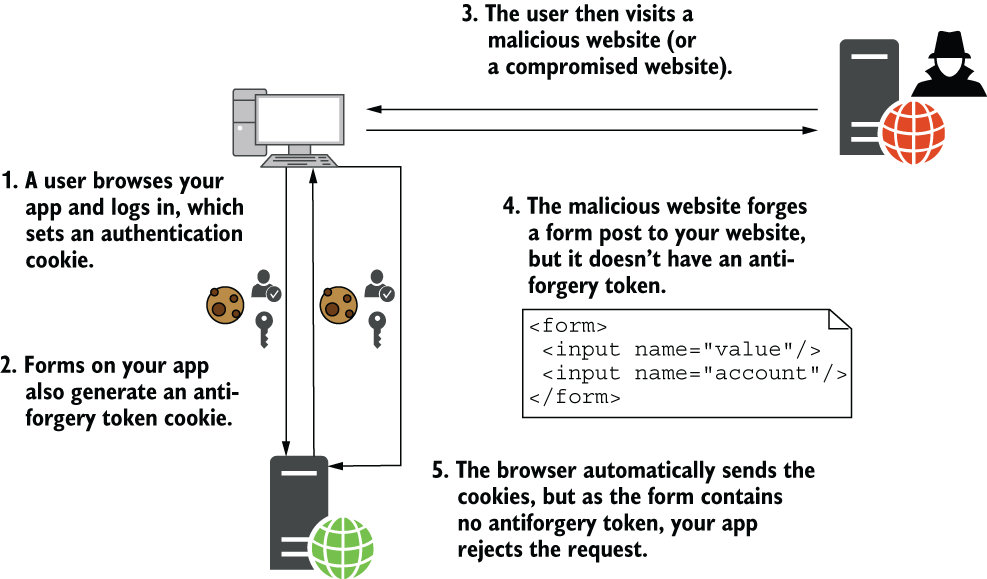
Compare the legitimate form’s two token parts with the forged request, which has only the automatically forwarded cookie token. section 29.2
In Razor Pages, keep the built-in protection unless you have a reason to change it:
- Forms created with Razor receive a hidden __RequestVerificationToken field, and inbound tokens are validated automatically. section 29.5 section 18.2.1
- The Form Tag Helper can omit its token when asp-antiforgery="false" is set; [IgnoreAntiForgeryToken] can disable validation. Understand the implications before using either option. section 18.2.1 section 29.5




