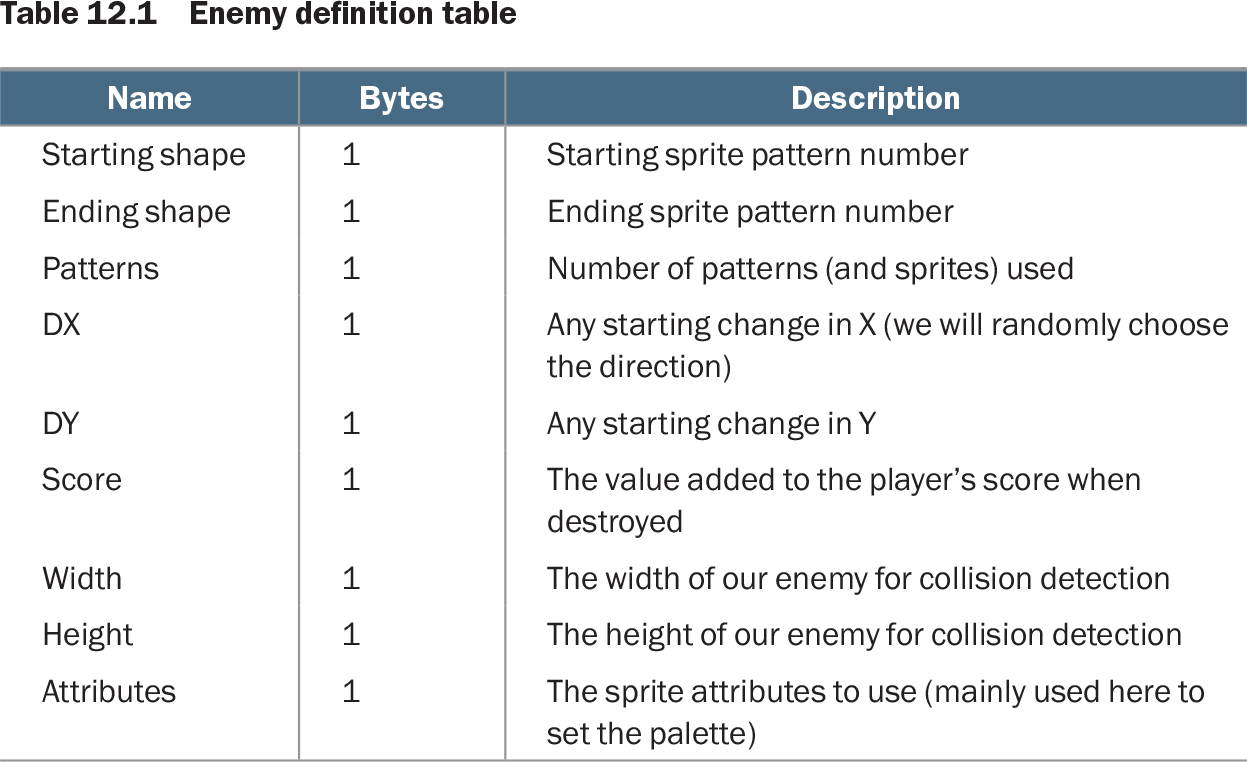
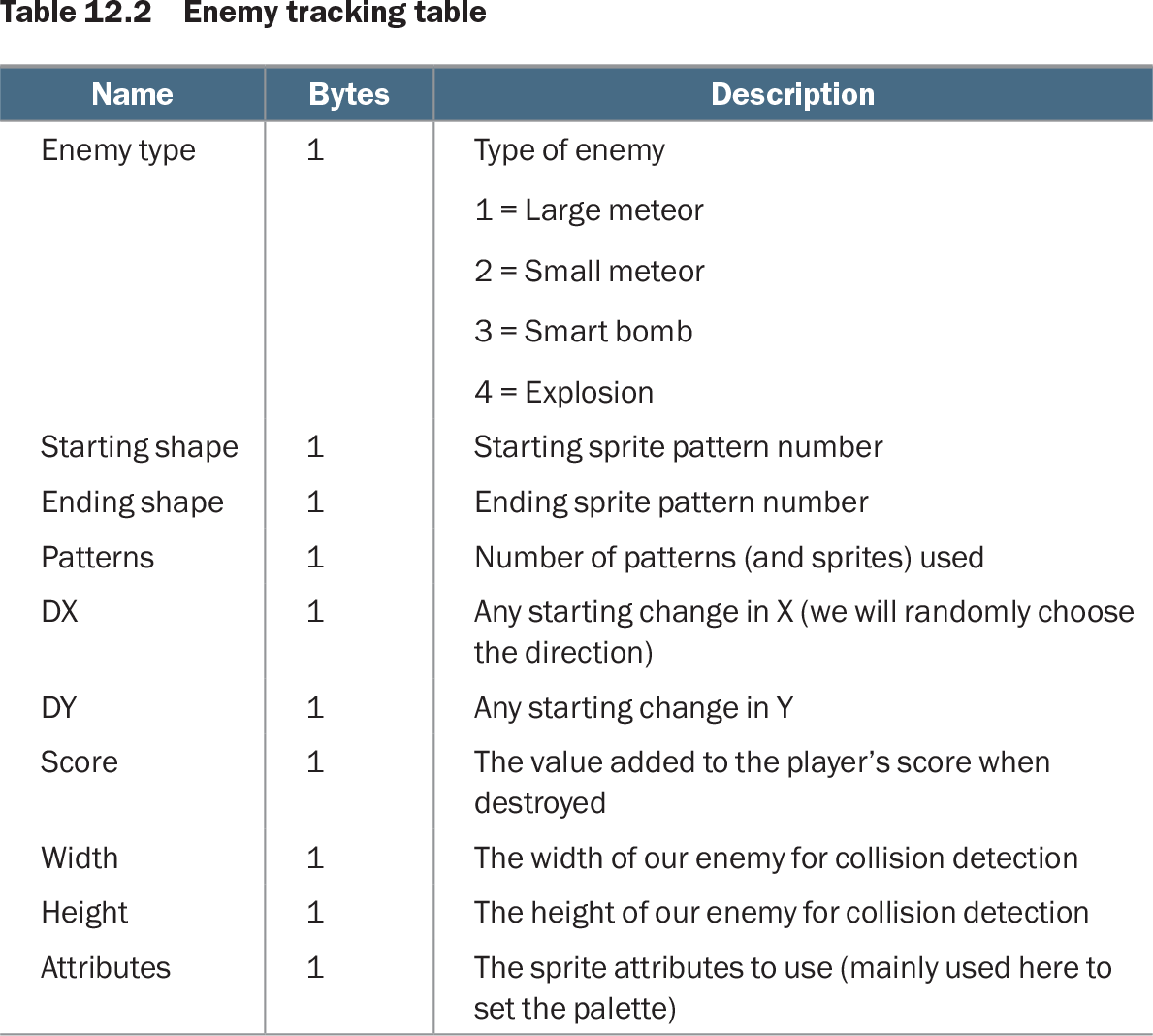
An enemy data table stores the attributes that define an enemy object. A read-only table in ROM describes each enemy type, while a RAM tracking table holds the copied attributes for each active enemy. This separates reusable type definitions from per-enemy state and lets movement, drawing, scoring, and collision code read the values it needs directly. section 12.1 section 12.2 section 12.6
Table 12.1 Enemy definition table (view table figure)
| Name |
Bytes |
Description |
|---|---|---|
| Starting shape |
1 |
Starting sprite pattern number |
| Ending shape |
1 |
Ending sprite pattern number |
| Patterns |
1 |
Number of patterns (and sprites) used |
| DX |
1 |
Any starting change in X (we will randomly choose the direction) |
| DY |
1 |
Any starting change in Y |
| Score |
1 |
The value added to the player’s score when destroyed |
| Width |
1 |
The width of our enemy for collision detection |
| Height |
1 |
The height of our enemy for collision detection |
| Attributes |
1 |
The sprite attributes to use (mainly used here to set the palette) |
Each ROM entry is nine bytes: sprite range, pattern count, X and Y movement, score, collision width and height, and sprite attributes. section 12.1
The ROM table has one row per enemy type. Its fields define the starting and ending sprite patterns, number of patterns, starting DX and DY movement values, score value, collision size, and palette-related sprite attributes. Adding a new type means adding its graphics and supplying another row with values in this fixed order. section 12.1
Table 12.2 Enemy tracking table (view table figure)
| Name |
Bytes |
Description |
|---|---|---|
| Enemy type |
1 |
Type of enemy 1 = Large meteor 2 = Small meteor 3 = Smart bomb 4 = Explosion |
| Starting shape |
1 |
Starting sprite pattern number |
| Ending shape |
1 |
Ending sprite pattern number |
| Patterns |
1 |
Number of patterns (and sprites) used |
| DX |
1 |
Any starting change in X (we will randomly choose the direction) |
| DY |
1 |
Any starting change in Y |
| Score |
1 |
The value added to the player’s score when destroyed |
| Width |
1 |
The width of our enemy for collision detection |
| Height |
1 |
The height of our enemy for collision detection |
| Attributes |
1 |
The sprite attributes to use (mainly used here to set the palette) |
The active-enemy table repeats the definition fields and adds an enemy-type byte, so each on-screen slot can be tested and updated independently. section 12.2
For each active enemy, the RAM table uses ten bytes:
- Enemy type identifies large meteor, small meteor, smart bomb, or explosion; a zero value acts as an inactive flag. section 12.2 section 12.6
- Starting shape, ending shape, and pattern count select and organize the enemy’s sprite graphics. section 12.1
- DX and DY control horizontal and vertical movement; width and height support collision and screen-boundary checks. section 12.2 section 12.4
- Score and attributes provide the points awarded on destruction and the sprite palette settings. section 12.1 section 12.4
Reserve one ten-byte record for every possible on-screen enemy. Ten simultaneous enemies require 100 bytes, so the larger buffer is placed in normal RAM rather than zero page. Clear all 100 bytes when a level starts; clearing the first byte of a record later marks that enemy inactive and accompanies hiding its sprites. section 12.2 section 12.4
Using one enemy record during movement
The movement loop advances through the table in ten-byte steps. For an active entry, it uses DX and DY to update sprite positions, uses height to decide when the enemy reaches the ground, and uses width and height when testing collisions with the player’s ship or bullet. A bullet hit clears the enemy flag, hides the sprites, and adds the entry’s score value. section 12.4 section 12.6
Earlier collision handling used hard-coded enemy dimensions. Storing width and height in each record allows differently sized enemies to share the same collision routine while supplying their own bounds. The same table-driven approach also supports enemy types with different movement speeds, sprite counts, palettes, and scoring behavior. section 9.2 section 12.6