Cumulative Layout Shift (CLS) measures how much visible page content moves unexpectedly during loading and other visual updates. A low-speed page can still feel broken when a button moves as someone taps it or an advertisement pushes article text downward. CLS is one of Google’s Core Web Vitals and can affect search visibility when competing pages have similar content quality. section 6.2.3 section 2.2.1
Table 3.3 Core Web Vitals for web applications
|
Metric
|
Measures
|
Example
|
|
Largest Contentful Paint (LCP)
|
Time until the largest visible content appears
|
A hero image or main headline finishes loading
|
|
Interaction to Next Paint (INP)
|
Delay between user interaction and visual feedback
|
User clicks “Add to cart” and sees the button respond
|
|
Cumulative Layout Shift (CLS)
|
How much the page layout shifts during loading
|
An ad loads late and pushes the article text down
|
Use the Core Web Vitals table to compare CLS with LCP and INP, and to identify late-loading content as a source of layout movement. section 3.2.1
A late-loading banner
An article initially renders without an advertisement, then the advertisement loads above the text and pushes it downward. The page may remain fast by other measures, but the unexpected movement increases CLS. The same problem occurs when a lazy-loaded image lacks reserved space or when a user taps a button that shifts before the interaction completes. section 3.2.1 section 6.2.3
Protect visual stability with an explicit operating routine:
- Measure CLS on high-traffic pages with Lighthouse or PageSpeed Insights. section 6.2.3
- Set a visual-stability budget of 0.1 or lower on every critical-path page. section 6.2.3
- Reserve space before shipping dynamically loaded banners, advertisements, and images. section 6.2.3
- For stricter protection, require all layout shifts to finish within the first 500 milliseconds and prevent later movement. section 6.2.3
Figure 3.2 Core Web Vitals data shown in Chrome DevTools.
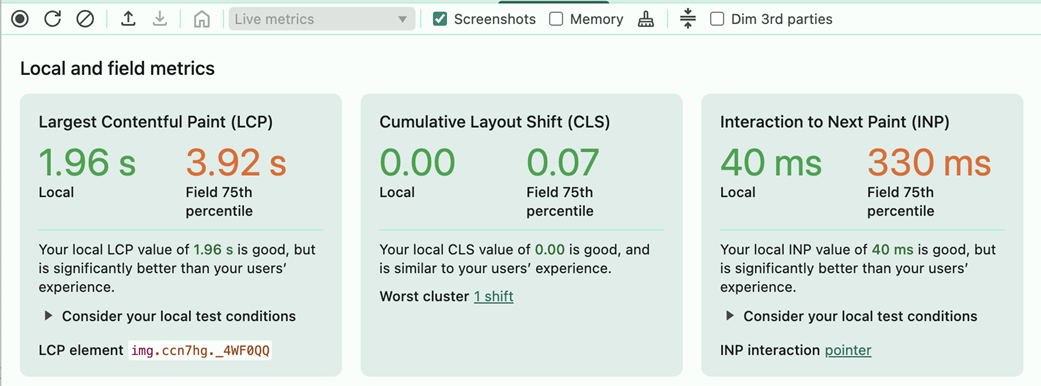
Use the Chrome DevTools view to inspect Core Web Vitals on a product page and locate pages that meet or miss CLS targets. section 3.2.1
