Cursor is an AI-centered code editor for vibe coding: developers describe a goal in natural language while an agent explores a project, plans work, edits files, runs terminal commands and tests, then reports what it did. Its interface resembles Visual Studio Code, but its workflow is built around LLM interaction and supervised autonomous tasks. section 10.2.1 section 10.5
Project-wide context lets Cursor use a codebase’s structure, dependencies, patterns, and documentation for multifile generation, refactoring, linting, and context-aware questions. Project rules such as .cursorrules can place team conventions in the agent’s instructions. This can accelerate small applications, but larger ones may still require manual fixes. section 10.2.2
Choose a mode based on the task:
- Agent plans, searches, builds, and carries out requests such as creating a database interface. section 10.5.3
- Ask answers questions about APIs or possible improvements to code. section 10.5.3
- Manual sends general-purpose prompts directly to the LLM without tool use. section 10.5.3
Iterate on a small game
Start with a detailed specification for a one-file Python Frogger-style game: runtime, library version, window, movement, scoring, code organization, and quality constraints. After testing, describe an observed problem plainly: logs overlap. Cursor can revise lane speeds, spacing, respawning, and log counts; review its explanation and the proposed diff before accepting individual changes or the whole file. section 10.4 section 10.8
Figure 10.10 There is a diff interface that comes up in Cursor. You can accept individual changes or accept the entire file if you like.
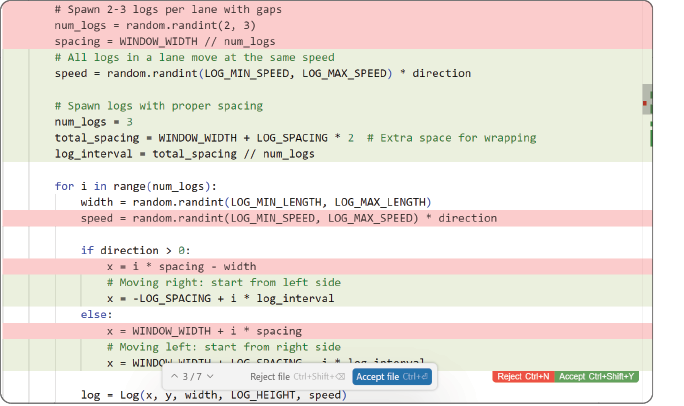
The diff view makes generated edits reviewable: accept individual changes or accept an entire file after inspecting the proposal. section 10.8
Treat natural-language generation as a fast prototyping loop, not a replacement for judgment. Give relevant context and clear constraints to reduce rework, then retain structured practices, accountability, and thorough testing for production, security-sensitive, and enterprise systems. section 10.9 section 10.4

