A custom control is a reusable .NET MAUI interface component built for behavior or appearance that standard controls do not provide cleanly on their own. Start with standard controls: they already cover most UI needs and support styling. Create a custom control when a repeated combination, a specialized interaction, or a platform presentation needs to be packaged once and used consistently. section 11.0 section 11.1
A practical first option is composition with ContentView. Put familiar controls together, expose the useful behavior, and use the result like one control. This avoids repeatedly adding the same controls to every page and becomes more valuable as the repeated UI grows more complex. section 11.1
A reusable numeric stepper
A stock-counting screen needs both quick increments and direct editing: entering a large number with only a Stepper is awkward, while a desktop-style arrow input is not ideal for touch. A custom stepper combines two Buttons with an Entry, letting people increase, decrease, or type a value. The containing view can then bind its count to one Value property rather than manage the internal controls separately. section 11.1 section 11.2
Figure 11.3 A templated control made up of two Buttons and an Entry. The Buttons can be used to increase or decrease the value of a bound property, and the Entry can be used to edit it directly.
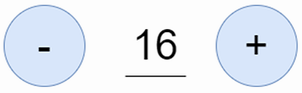
See the composed control: two buttons change a bound value, while the entry edits that value directly. section 11.1
Expose values that a page must bind through bindable properties. A binding target must inherit BindableObject and its target property must be bindable; ContentView already descends from BindableObject. This lets a control keep its internal buttons and fields private while presenting a small external API, such as one numeric value or a unified DTO assembled from several fields. section 11.2
When adding behavior to a composed control, keep its public behavior aligned with the surrounding UI:
- Reuse familiar property names where appropriate. A custom stepper can provide IsEnabled so callers use the same convention as other .NET MAUI controls. section 11.2.2
- Set a suitable default value for trigger-driven state; a trigger that disables a control must be able to revert it to enabled when its condition no longer applies. section 11.2.2
- Propagate state changes to the inner controls. When the outer stepper is disabled, its entry and increment and decrement buttons should be disabled too. section 11.2.2
- Replace an inner control with a compatible subclass when a focused customization is needed. A BorderlessEntry can replace an Entry in the stepper while retaining Entry behavior. section 11.3.4
Custom controls can also customize native controls with handler mappings or be drawn with Microsoft.Maui.Graphics; approaches can be combined. For controls that embody a shared brand, style guide, or design language, place reusable controls in a .NET MAUI control library so multiple apps can use them. Choose meaningful, specific names rather than generic names such as CustomStepper. section 11.0 section 11.4
