A custom cloud image is an organization-specific VM template built from a vendor-supplied SQL Server image and modified for required components, security settings, and ongoing configuration. Mistake #42 is using the vendor image unchanged because it appears convenient; the baked-in instance can drift from operational and security requirements. section 8.10
Avoid the unchanged-image mistake with this practical workflow:
- Start with the cloud provider’s SQL Server image when the license-included model is required; this keeps the SQL Server license in the VM’s hourly cost. section 8.11
- Create a VM from that image, then remove unnecessary components such as Analysis Services or Integration Services to reduce resource use and attack surface. section 8.10 section 8.11
- Apply required security and configuration settings, such as CIS compliance, and use PowerShell DSC or another configuration-management tool to preserve them. section 8.10 section 8.11
- Capture the configured VM as a private managed image rather than repeatedly deploying the unchanged vendor image. section 8.10
Azure and AWS capture
In Azure, customize the VM and choose Capture, then configure the image properties and keep it as a private managed image. In AWS, open the EC2 instance, choose Image and Templates > Create Image, and assign a name and tags. section 8.10
Figure 8.4 Fresh EC2 instance with SQL Server AMI
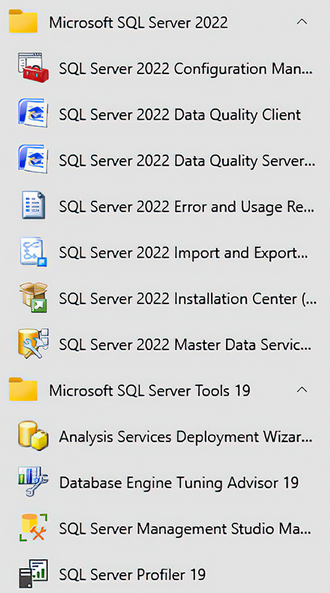
Use the fresh EC2 SQL Server instance as the vendor-image starting point before customization. section 8.10
Figure 8.5 Freshly built Azure VM with SQL Server image
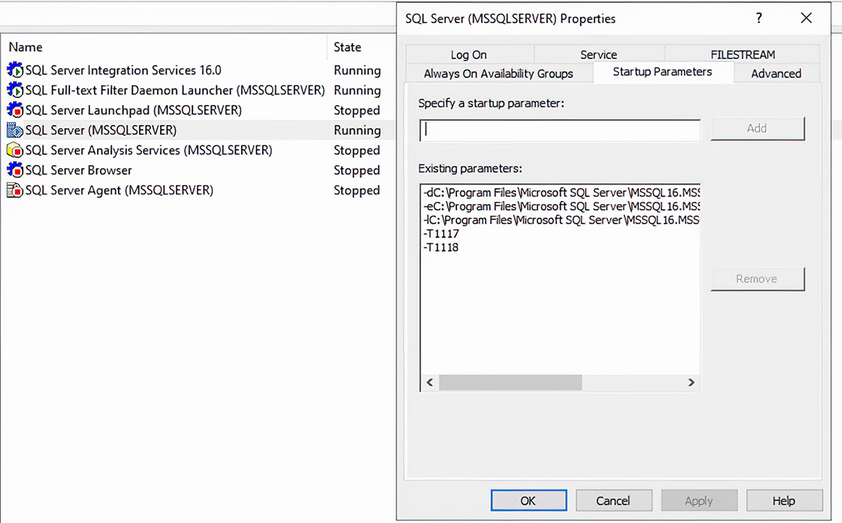
Use the fresh Azure SQL Server VM as the corresponding starting point for a custom image workflow. section 8.10
