A custom tool is an application-defined operation that an AI model can invoke with specified parameters to obtain structured results. It can call an API, query a database, or run local application logic while execution remains under server control. section 4.4.1 section 4.4.2
Implement a custom tool with these moving parts:
- Define a function that accepts explicit parameters and returns structured data validated with a Zod schema. section 4.4.2
- Register the function in the Vercel AI SDK tools object with a name and description that guide model selection. section 4.4.2
- Let the model request the tool, execute it on the application server, and send its result back for the final response. section 4.4.1
- Render tool output as React components, including loading states and the completed result. section 4.4.2
Weather assistant
Register getWeather with a description such as “Get the current weather for a specific city” and a parameter schema containing city: z.string(). The generator can yield a loading spinner, fetch weather data, and return a WeatherCard. A system instruction tells the model to use getWeather for city-specific requests and interpret temperatures in Celsius. section 4.4.2
Figure 4.14 The process of tool calling in an AI-powered application using the Vercel AI SDK. This shows how a user action initiates a prompt, which is formatted by the SDK and sent to the AI provider. The AI model may request a tool call, which is then executed by the SDK. The tool’s response is fed back to the AI model through the SDK, and finally, the result is used to update the UI for the user.
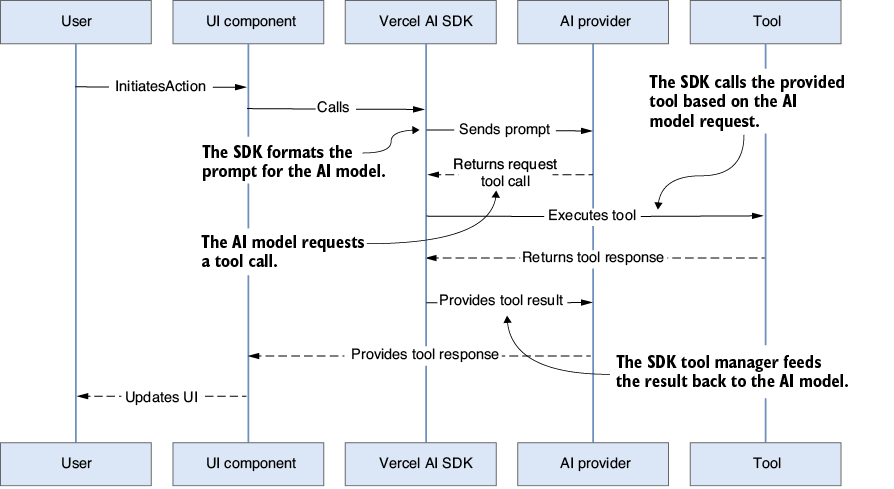
Trace the request from user prompt through the AI provider, tool execution, returned tool result, and UI update. section 4.4.1
