d3.forceLink() adds a connecting force between nodes named by graph links. In a network diagram, it pulls connected nodes together; stronger connections pull them closer. section 12.4.1
Configure the force with an id() accessor so D3 can match each link’s source and target to a node. Node IDs must be unique. Use strength() to make link pull proportional to a link weight, such as the number of scenes two characters share. section 12.4.1
Combine link force with other forces to produce a readable network layout:
- Use forceCenter to keep the network near the SVG center. section 12.4.1
- Use a strong negative forceManyBody to push nodes apart. section 12.4.1
- Use forceCollide to avoid overlapping node circles. section 12.4.1
- Update both circle and line positions on every simulation tick. section 12.4.1
Character co-occurrence network
Represent Romeo and Juliet characters as circles and shared scenes as links. Set each link’s strength from its weight: characters sharing more scenes settle closer together, while link width can also show that weight. section 12.4.1
Figure 12.19 Network visualization of the Romeo and Juliet characters. Each circle represents a character, and their size is proportional to the number of lines they have in the play. The links between the nodes represent the number of scenes they share. The closer two nodes are to each other, the more scenes they share in the play.
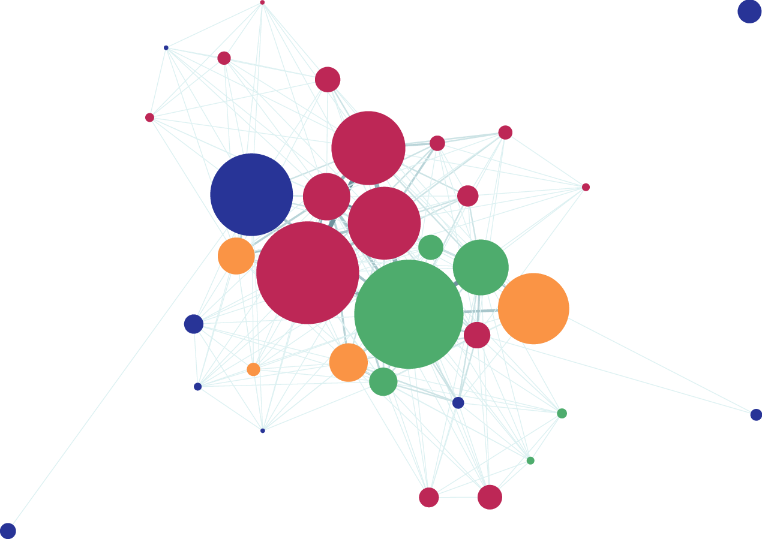
The completed network makes the force’s visible result clear: proximity encodes stronger shared-scene connections. section 12.4.1
