A link force pulls connected nodes toward one another in a force-directed network. With d3.forceLink(), stronger connections produce closer node pairs, so distance becomes part of the visual encoding of relationship strength. section 12.4.1 section 12.5
Use a link force as one part of a simulation rather than as a complete layout. Centering keeps the network in view, many-body repulsion spreads nodes apart, collision prevents overlap, and the link force preserves the pull of the edges. The simulation recalculates node position and velocity on ticks, while the rendering updates both node circles and edge lines. section 12.4.1 section 12.4
To add a link force to a network simulation:
- Represent the network with separate node and edge data; each edge identifies a source and target node. section 12.5
- Provide an id() accessor so source and target references resolve to uniquely identified nodes. section 12.4.1
- Set strength() from an edge weight when stronger relationships should pull nodes closer together. section 12.4.1
- Update edge endpoints as well as node positions on every simulation tick. section 12.4.1
Character co-occurrence network
A Romeo and Juliet network uses one circle per character and one link for characters sharing scenes. Link weight represents the number of shared scenes: characters with more scenes together settle closer together. Circle size represents each character’s number of lines. section 12.4.1
Figure 12.19 Network visualization of the Romeo and Juliet characters. Each circle represents a character, and their size is proportional to the number of lines they have in the play. The links between the nodes represent the number of scenes they share. The closer two nodes are to each other, the more scenes they share in the play.
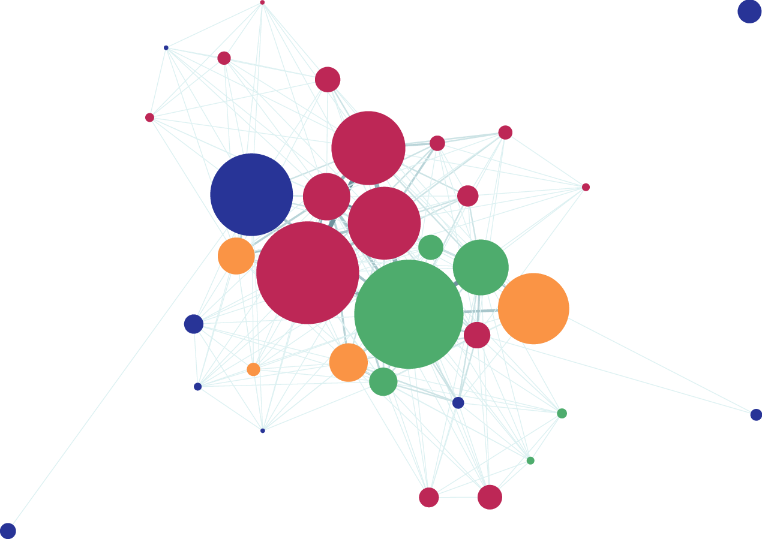
Inspect how weighted scene-sharing links translate into a network where proximity communicates relationship strength. section 12.4.1
Force layouts run in real time and can be resource-intensive. Use a force-directed diagram only when it suits the network structure and audience, and apply optimization techniques when the simulation could tax the user’s computer. section 12.5
