D3.js, short for Data-Driven Documents, is an open-source JavaScript library for creating dynamic, interactive web visualizations. Rather than offering a single bar-chart function, it provides small, composable functions for binding data to document elements and controlling the resulting graphics. That lower-level approach takes more code, but gives you unusual creative and technical freedom. section 1.1 section 1.1.3
Use D3 when a visualization must be custom, responsive, interactive, and shareable as web content: a domain-specific dashboard, a scrollytelling story, or a graphic that goes beyond predefined chart types. It is usually less efficient than dedicated charting tools for quick, conventional charts or exploratory work. section 1.1.1 section 1.1.2
A typical D3 workflow moves from data to visible, interactive elements:
- Load a prepared CSV or JSON dataset, then format values and inspect characteristics such as minimum and maximum values. section 1.1.3 section 3.2
- Bind data to DOM elements, commonly SVG shapes, so each datum can produce a visual element. section 3.0
- Use scales to translate data values into screen positions, sizes, or colors, then add axes and labels. section 1.1.3 section 3.0
- Add mouse-driven behavior for actions such as filtering or zooming. section 1.1.3
Build a bar chart explicitly
A bar chart begins by appending an SVG container, then creating one rect per data point. Scales determine rectangle dimensions, and separate calls add the x- and y-axes. The same explicit pieces can be recombined for graphics and interactions that conventional chart libraries do not provide. section 1.1.3 section 2.1
D3 works within the browser ecosystem: the DOM, HTML, CSS, JavaScript, SVG, and Canvas. Select DOM elements with d3.select() or d3.selectAll(), append elements, and set attributes or inline styles. D3 code commonly uses method chaining, while datasets are often arrays of JavaScript objects. section 1.2 section 2.7 section 1.4
For a simple page, load D3 before your own script with a script tag. In framework projects, install the d3 package as an NPM dependency. With React or similar frameworks, a useful strategy is to let the framework render and update the DOM while using D3 for calculations such as scales and shape generators. section 2.2.2 section 8.2 section 8.6
Figure 1.7 How to approach data visualization with D3.js
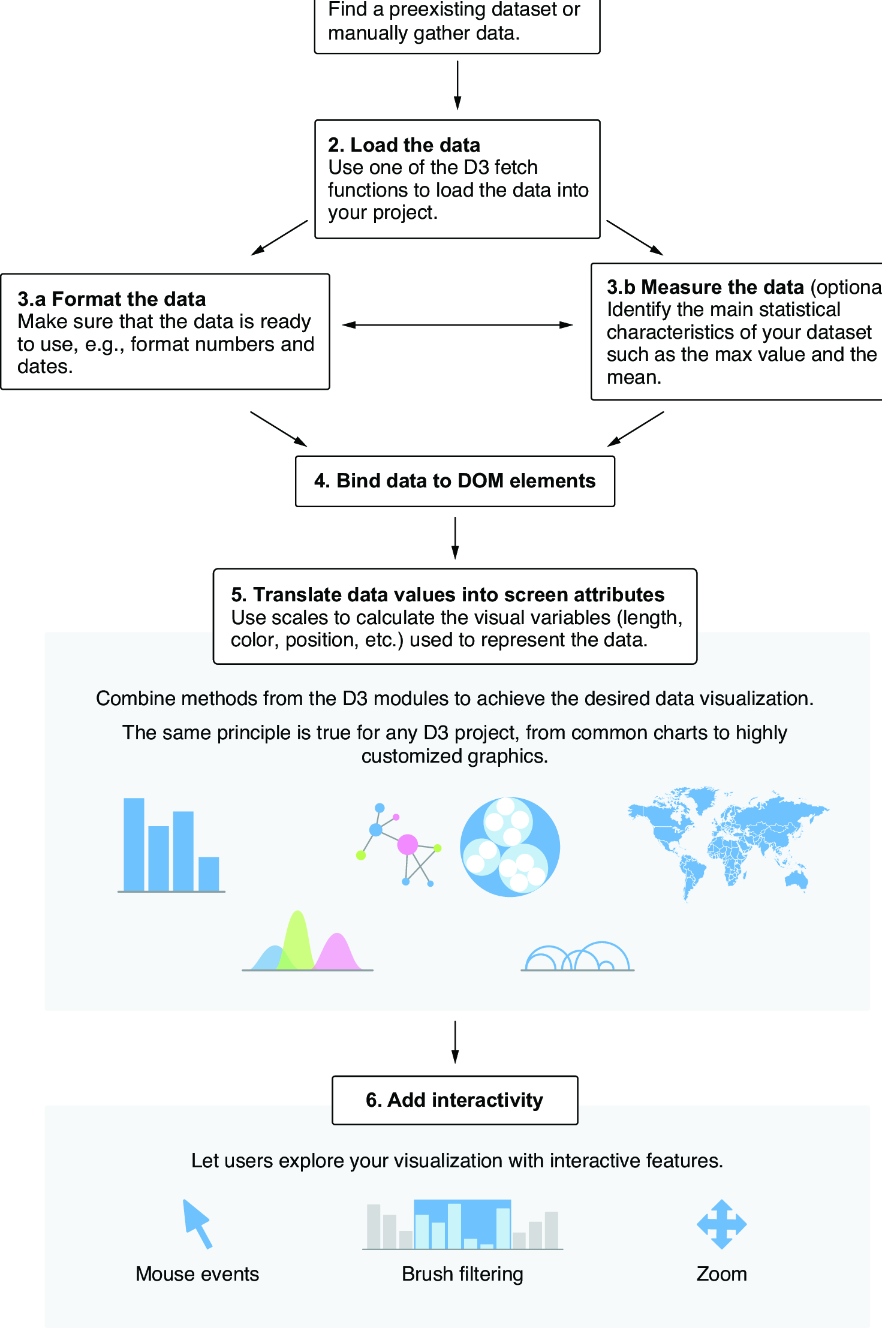
Use this workflow diagram to connect dataset loading, data preparation, visual construction, and interaction into one implementation process. section 1.1.3


