A DAG file is a Python script that declares an Airflow DAG: its tasks, directed dependencies, execution metadata, and schedule. Airflow parses the file to derive the graph and synchronize changes. section 1.2.1
Use a DAG file to define and operate a workflow while keeping parse-time work lightweight:
- Represent tasks as graph nodes and dependencies as directed edges. section 1.2.1
- Declare metadata that tells Airflow how and when to execute the DAG. section 1.2.1
- Avoid long computations, cloud or database reads, and credential retrieval during file parsing; perform them inside task functions instead. section 12.1.4
- Deploy files through a container image, persistent volume, or Git synchronization, choosing between immutable releases and externally synchronized files. section 17.2.7
Move expensive work into task execution
Instead of calculating a value while Airflow loads the DAG file, calculate it inside the callable used by the task. Likewise, pass a connection identifier such as "my_api_conn" and fetch credentials when the task runs, rather than querying the metastore during every parse. section 12.1.4
Figure 1.7 Airflow pipelines are defined as DAGs using Python code in DAG files. Each DAG file typically defines one DAG, which describes the tasks and their dependencies. The DAG also defines a schedule interval that determines when Airflow executes the DAG.
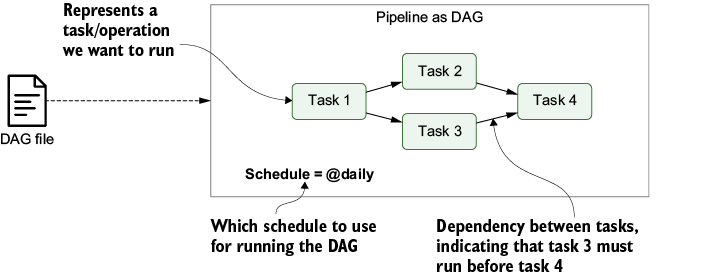
Use the diagram to trace how Python code becomes a DAG of tasks and dependencies with a schedule interval. section 1.2.1
