Dashboard layout is the deliberate arrangement of information, controls, and visual breathing room. Start by placing the most important content toward the top left and the least important toward the bottom right, following the usual left-to-right, top-to-bottom reading path. section 8.3.3
A practical starting layout:
- Fit the first draft roughly to a laptop screen, place a logo and title at the top left, put filters and controls to the right, and use the remaining space for primary content. section 8.3.3
- Leave generous white space around and between elements; begin with about 20 pixels, then adjust as the design needs. section 8.3.3
- Use research notes to identify what matters most to users before deciding what belongs where. section 8.3.3
- Sketch several arrangements and collect useful patterns from dashboards and other visual designs; inspiration can come from almost anywhere. section 8.3.3
When less really is more
A crowded concept with a zillion bar graphs was replaced by a calendar showing stayovers, check-ins, and checkouts, paired with a line chart for adults and children by room type. The result made the information easier to organize without turning the dashboard into graph soup. section 8.3.3
Figure 8.3 Just a few simple examples of how to lay out a dashboard for desktop or tablet. Notice how there’s plenty of space between elements and around the outside of the dashboard.
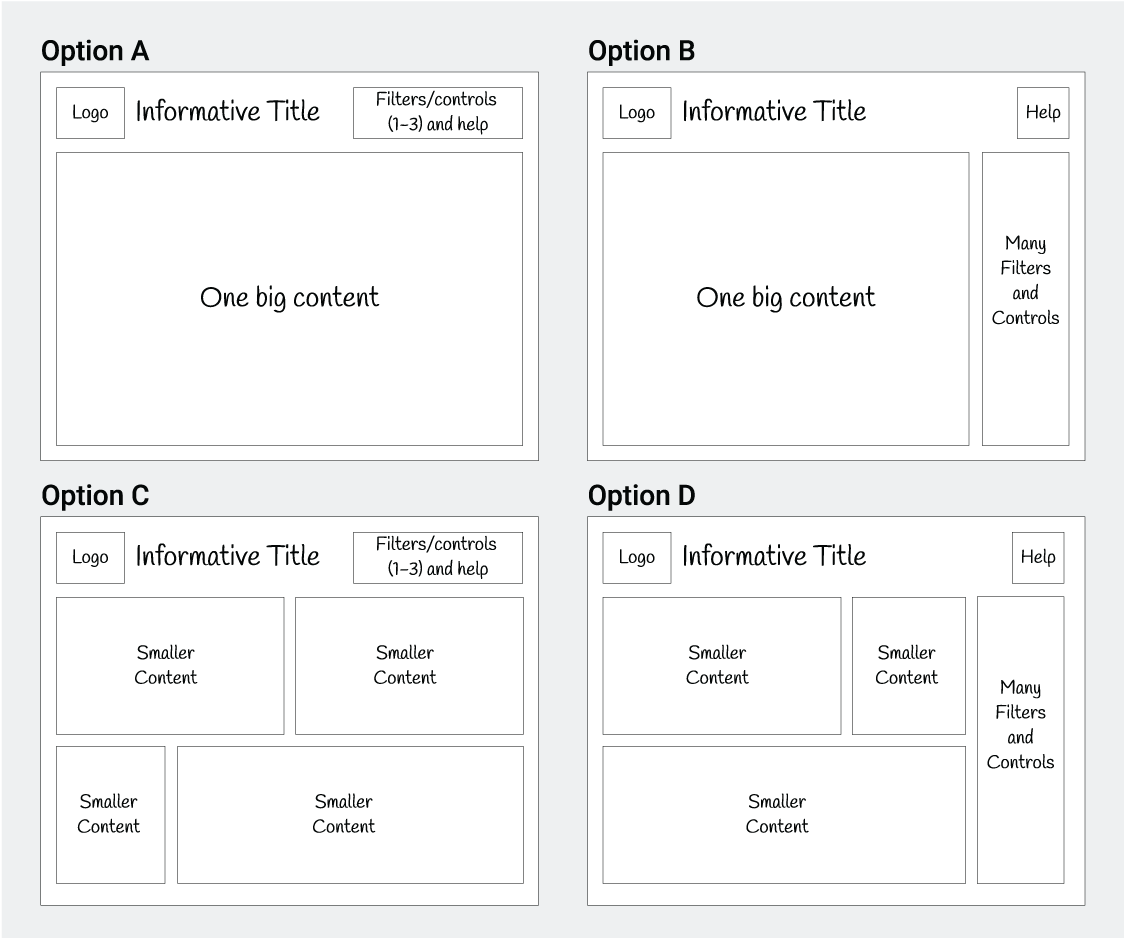
Compare simple desktop and tablet arrangements, paying attention to the space between elements and around the dashboard. section 8.3.3
