A data flow task is an SSIS control-flow task for moving and transforming rows through connected data-flow components. Add it to the control flow, then open it by double-clicking it or selecting the Data Flow tab. Within a data flow, the toolbox changes from control-flow tasks to data-flow components. section 6.0
Mistake #22: silently losing bad rows. A load can appear successful while rows that fail a component are discarded or ignored. Configure the path deliberately: successful rows use the normal output, while failed rows can follow a red error path to a separate destination. There is no completion data path. section 6.0 section 6.1
Build a basic file-to-staging data flow with these choices:
- Drag a data flow task onto the control flow and name it for the load, such as Load Impressions Staging. section 6.1
- Create a flat file connection manager for the CSV file; set its encoding, file format, comma delimiter, and column properties. Treat inferred types cautiously because SSIS samples only the first 100 rows. section 6.1
- Create an OLE DB connection manager for the SQL Server database and select the required provider. section 6.1
- Send rejected rows to an error output and retain the error details instead of setting failures to Ignore failure. section 6.1
Dirty impression load
An impressions.csv file can load into wide VARCHAR staging columns but fail later when a row must convert to a destination type. A task that loads directly into marketing.Impressions can then fail as a whole, without identifying the specific row. Use a data flow with an error output to preserve failed-row details for investigation while keeping the valid-row path explicit. section 6.1 section 6.3.1
Data flow tasks also replace some set-based loading orchestration when row-level conversion and handling are needed. In the impression pipeline, loading marketing rows and aggregates is moved away from Execute T-SQL Statement tasks, while truncating the staging table remains a control-flow T-SQL task. Join control-flow tasks with success constraints when later steps must wait for earlier ones. section 6.3.1
Figure 6.6 Data flow with error output
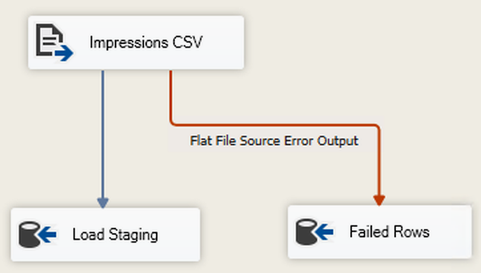
Inspect the separate error-output path as a concrete pattern for retaining failed rows instead of throwing them away. section 6.1
