An SSIS package organizes an ETL workflow in a drag-and-drop GUI. Its single control flow orchestrates tasks; zero or more data flows import, export, and transform data in memory buffers. Connection managers supply the file and SQL Server connections those flows use. section 6.0 section 6.1
Do not assume connected tasks run safely or sequentially by default. Precedence constraints define order and response: success runs the next task only after success, failure after failure, and completion after either result. Use them to make error handling explicit. section 6.0
Configure a basic file-to-staging package deliberately:
- Add a data flow task to the control flow, such as Load Impressions Staging. section 6.1
- Configure a flat file connection for the file name, encoding, format, delimiter, and column properties. section 6.1
- Treat inferred types cautiously: SSIS samples only the first 100 rows, so choose types yourself unless that sample is representative. section 6.1
- Configure an OLE DB connection manager with a provider, SQL Server instance, and target database. section 6.1
Keep failed rows visible
A CSV load can fail when a row cannot be parsed or loaded. Setting an error output to ignore failure may make the package appear successful while discarding data. Instead, route error output to an error table so the failed value, error code, and error column can be reviewed. section 6.1
Figure 6.6 Data flow with error output
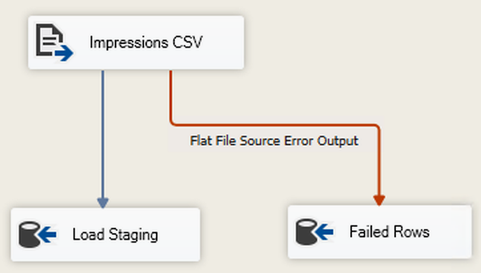
Use the error-output data-flow diagram to distinguish the normal staging path from the path that preserves failed rows for investigation. section 6.1
