Training one sample at a time can leave computing resources underused. PyTorch’s DataLoader takes samples from a Dataset, groups them into batches, and supplies those batches to a training or validation loop. The Dataset provides individual samples; the DataLoader handles sampling and collation. section 13.3.2 section 13.13
Three settings shape how a loader supplies data:
- batch_size sets how many samples go into a minibatch. A model can then process multiple samples together. section 7.2.5 section 13.3.2
- shuffle=True shuffles training data at the beginning of each epoch. Validation can instead use shuffle=False. section 7.2.5
- num_workers enables separate processes to prepare batches in the background, overlapping data loading with GPU computation. section 13.3.2
From image dataset to training loop
Create a loader with `train_loader = torch.utils.data.DataLoader(cifar2, batch_size=64, shuffle=True)`, then iterate with `for imgs, labels in train_loader:`. Each iteration supplies a minibatch: `imgs` has shape `64 × 3 × 32 × 32` for 64 RGB images, and `labels` has 64 label indices. A separate validation loader uses `shuffle=False` while checking classification accuracy. section 7.2.5
Figure 7.14 A data loader dispensing minibatches by using a dataset to sample individual data items.
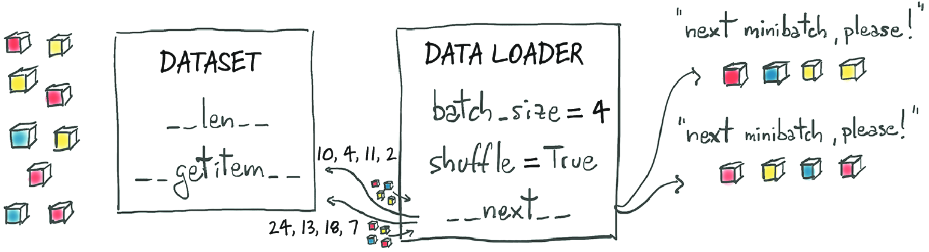
The diagram shows how a loader uses a dataset’s individual items to dispense minibatches. section 7.2.5
The same pattern works when samples come from CT scans rather than small images: build a Dataset, pass it to a DataLoader, and iterate over the resulting batch tuples. With workers enabled, batches can be prepared while the GPU processes an earlier batch. Worker count and batch size are worth testing together, because some combinations may exhaust available memory. section 13.3 section 13.3.2 section 13.12



