A database cluster is a group of database nodes that work together to store data and serve requests. In ScyllaDB, nodes have no single all-powerful leader: data is distributed across them and replicated, so the cluster can remain available when a node fails and can spread traffic across machines. section 1.1.3
Cluster size is a reliability and operations choice. Adding nodes can increase capacity, but each new node must join the cluster, take ownership of data slices, and receive data from existing replicas. More nodes also mean more machines to upgrade and maintain. section 1.3.2
A three-node local cluster
Run three ScyllaDB containers on a dedicated Docker network to let them communicate by DNS name. Three nodes make it possible to use quorum consistency: a majority can respond successfully even when one node is offline. This setup is useful for testing distributed behavior, failures, reads, and writes locally. section 2.1 section 2.1.1
Figure 2.1 Launching three Scylla nodes in Docker containers lets you test a cluster on a local machine.
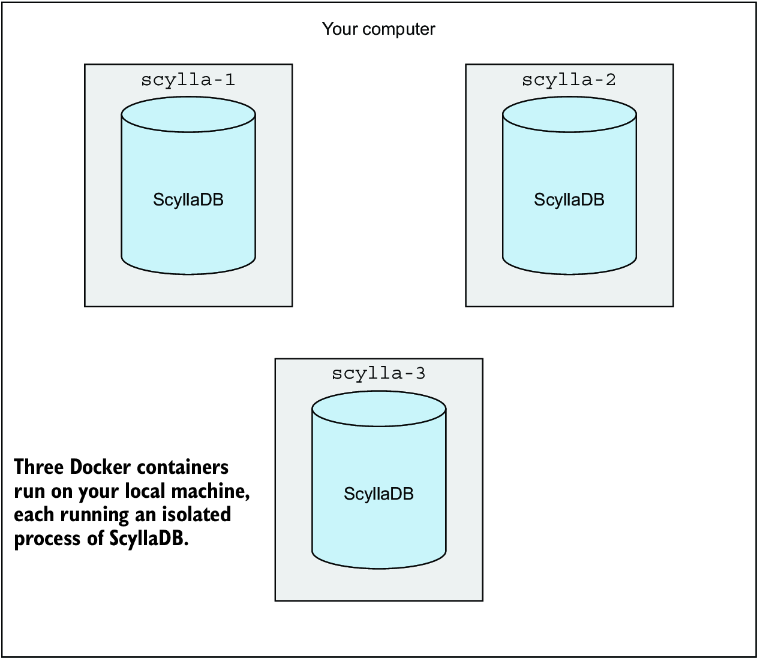
Use the three-container layout to visualize a local cluster before testing how a node failure affects quorum operations. section 2.1
A production cluster moves nodes onto separate dedicated servers, often across zones, to support fault tolerance. Design begins with topology and resources, then validates sizing under representative traffic. Capacity planning must account for replicated storage, disk speed, CPU, memory, network bandwidth, and cost. section 9.1 section 9.2.2
Local application development may instead use a single-node cluster to reduce resource use and avoid Docker port-mapping complications with drivers. That convenience is not a production design: a single node does not provide the cluster’s failure tolerance. section 10.2.1
Operating a live cluster includes:
- Monitoring health and using nodetool to diagnose problems or perform maintenance tasks. section 9.3
- Planning upgrades and operating changes across every node rather than treating the database as one machine. section 1.3.2
