The video streaming microservice delivers a requested video to the user. It handles the streaming response while a separate video-storage microservice locates and retrieves the file. Keeping those responsibilities apart lets the storage provider change without making the streaming service depend on its details. section 4.4.6 section 4.5.5
Build the route in stages:
- Start with an Express GET /video endpoint. Replace direct filesystem loading with an HTTP request to the video-storage service, then stream its response to the client. The first version uses a hardcoded test-video path. section 4.4.2
- Add a MongoDB connection for video metadata, including the stored video path, so the route no longer relies on that hardcoded path. Configure the connection with DBHOST and DBNAME. section 4.5.2 section 4.5
- In the fuller application, use the requested video ID to obtain a stream from video-storage and pipe it to the response. Broadcast a “video viewed” message; the history microservice can record it without a direct request from video-streaming. section 10.7.5 section 5.7.5
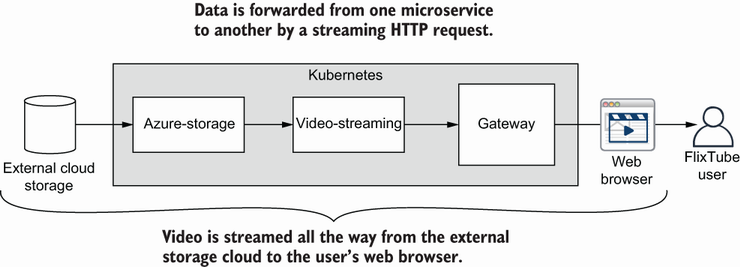
Follow the video from external storage through video-storage, video-streaming and the gateway to the browser. Each service forwards the stream toward the user. section 10.7.5
Run and check the two-service version
From chapter-4/example-2, run docker compose up --build after setting the storage account environment variables. Open http://localhost:4001/video: the test video should play. This checks both services together, because video-streaming depends on video-storage. Testing video-streaming alone would require a simulated storage dependency, which is deferred. section 4.4.3 section 4.4.4 section 4.4.2
For a local Kubernetes deployment, apply the deployment configuration with kubectl apply -f scripts/deploy.yaml, then check pods, deployments and services with kubectl get. A running pod and an exposed service confirm that this deployment is available; they do not replace the browser test of the multi-service video path. section 6.8.5 section 4.4.4
