DBSCAN (density-based spatial clustering of applications with noise) groups observations in densely populated regions and leaves sufficiently isolated observations as noise. It is useful when clusters may have irregular shapes or outliers matter. Unlike k-means, it does not require a chosen number of clusters. section 2.5.2
Two parameters determine what counts as dense. ε sets the radius of each point’s neighborhood; minPts sets the minimum number of points within that radius, counting the point itself. A point meeting that threshold is a core point. Nearby border points can join a cluster, while points outside dense regions remain noise. Connected core points allow a cluster to extend beyond any one point’s immediate neighborhood. section 2.5.2
Figure 2.29 Core points are shown as squares; border points are shown as filled circles, while noise is unfilled circles. Together, these three are the building blocks for DBSCAN clustering.
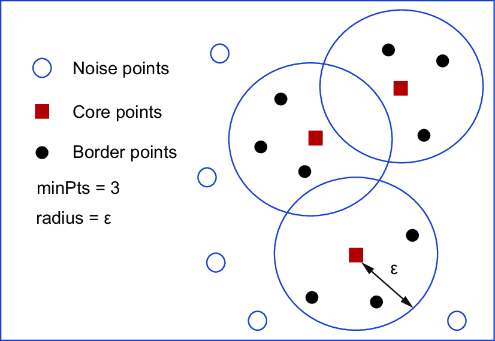
The diagram distinguishes core points, border points, and noise—the three categories to inspect when interpreting a DBSCAN result. section 2.5.2
A practical Python workflow is:
- Prepare the features and standardize them before fitting, so the chosen neighborhood radius applies to the prepared data. section 2.5.2
- Inspect a sorted nearest-neighbor distance plot to help choose ε, then fit `sklearn.cluster.DBSCAN(eps=..., min_samples=...)` on the standardized features. section 2.5.2
- Read the fitted `labels_`, inspect the distinct labels, and plot the labeled observations to judge whether the grouping is useful. section 2.5.2
Fit and inspect clusters
With standardized features in `X_standard`, fit `DBSCAN(eps=1.5, min_samples=5).fit(X_standard)`, then inspect `labels_` and plot the first two features colored by label. The radius is a parameter to examine against the distance plot, not a universal setting. For practice, compare DBSCAN with k-means on the iris dataset, or use clustering to identify customer groups in online retail transactions. section 2.5.2 section 2.9


