Security is not a single switch you turn on. Defense in depth protects data through multiple layers, so one failed barrier need not leave everything exposed. Azure applies this approach across its infrastructure and services, while some security choices remain yours to configure. section 6.1.1 section 6.0
Think of a castle
A castle does not depend on one guard at the gate. A visitor might face a gatehouse, moat, drawbridge, outer wall, inner wall, keep, and guards inside. Each barrier gives the defenders another chance to stop an intruder. In Azure, the treasure at the center is your data—no crocodile-filled moat required. section 6.1.1
Azure names seven layers of defense:
- Physical: the data center itself, with entry restricted to authorized, authenticated personnel. section 6.1.1
- Identity, perimeter, network, compute, application, and data: additional layers between an attacker and the data being protected. section 6.9
Figure 6.3 Azure layers of defense in depth
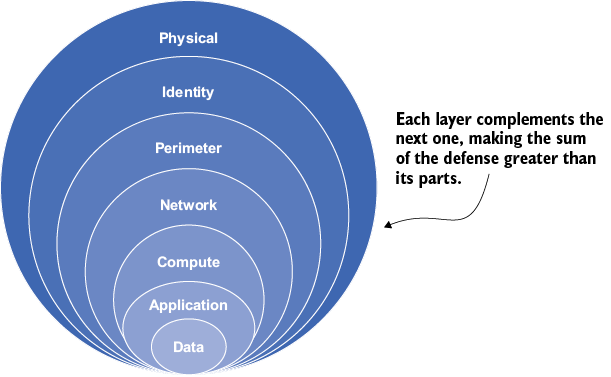
The Azure layers diagram shows the seven defenses together, rather than as one security feature. section 6.1.1
Layers do not remove the need to make security decisions. Use the shared responsibility model to identify what you must secure, and use zero trust to grant identities only the access they need. Microsoft Defender for Cloud can recommend improvements to your security posture. section 6.0 section 6.9






