A degree distribution describes how connection counts are spread across a graph’s nodes. For each node, degree is its number of links; examining all of those values is a basic way to characterize network structure. In directed graphs, inspect two distributions: in-degree for incoming relationships and out-degree for outgoing relationships. section 5.0 section 5.1.1
Start with a familiar follower network. Rather than looking only at individual users, count each user’s FOLLOWS relationships and summarize the resulting values. Mean, maximum, and percentiles reveal both the typical connection count and the long tail of unusually connected nodes. section 5.1.1
Listing 5.1 Evaluating the node out-degree distribution with the apoc.agg.statistics function
MATCH (u:User)
WITH u, count{ (u)-[:FOLLOWS]->() } AS outDegree
RETURN apoc.agg.statistics(outDegree)
This query counts each User node’s outgoing FOLLOWS relationships, then passes those counts to APOC statistics. The result summarizes the full out-degree distribution rather than returning one row per user. section 5.1.1
Percentiles make a skewed distribution easier to interpret. In the follower network, the mean out-degree is nearly 7, but the median is 2: half of users have two or fewer outgoing connections. The 90th percentile is 21, so only about 10% have more than 21 outgoing relationships. Averages alone can hide this imbalance. section 5.1.1
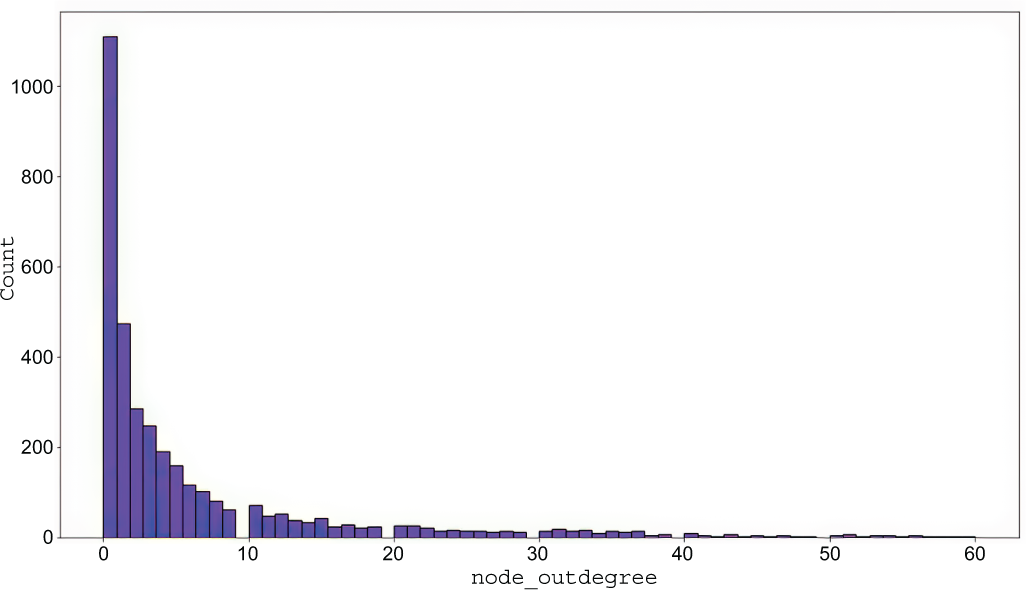
A histogram provides a visual view of the out-degree counts, complementing the numerical summary and making the concentration of low-degree nodes easier to inspect. section 5.1.1
Run the same analysis in reverse to measure in-degree. In a follower graph, high in-degree identifies users followed by many others. The top in-degree values can then prompt a closer look at the relationships or content around a notable account. section 5.1.1
Projected retweet amplification network
When a network exists only as an in-memory projection, use Graph Data Science rather than a plain Cypher count. `gds.degree.stats('amplify')` returns the out-degree centrality distribution. Here, the mean is about 1.5 and the median is 1, supporting the observation that the inferred network is sparse. Use `orientation:'REVERSE'` for in-degree, or provide `relationshipWeightProperty:'weight'` to summarize weighted degree. section 6.2.1 section 6.5
Use degree distributions to move from raw relationships to practical observations:
- Separate incoming from outgoing connections when relationship direction matters. section 5.1.1
- Compare median and percentiles with the mean to detect a small set of high-degree nodes. section 5.1.1
- Use weighted degree when relationship weights represent amplification or another meaningful quantity. section 6.2.1
- Use streamed degree scores to rank individual nodes after understanding the overall distribution. section 6.2.1
