The MCP Tools component acts as a gateway between a Langflow flow and an MCP server. It retrieves the server’s available tools and presents them in a selectable dropdown. section 8.3
Use the component through a short setup and testing workflow:
- Add the MCP server once by pasting its JSON connection configuration; reuse the saved server afterward. section 8.3
- Place the resulting MCP Tools component on the canvas, select a tool, enter a prompt, run it, and inspect the output. section 8.3
- Enable Tool Mode when an agent should freely choose which MCP tool to call and how. section 8.3
Testing a culinary tool
Select a culinary tool, ask for a recipe inspired by Venice, run the component, and inspect the returned recipe. If deployment reports an invalid API key, reenter the missing keys before testing again. section 8.3
Figure 8.17 You can test any tool from the MCP server by sending an input prompt and checking the response.
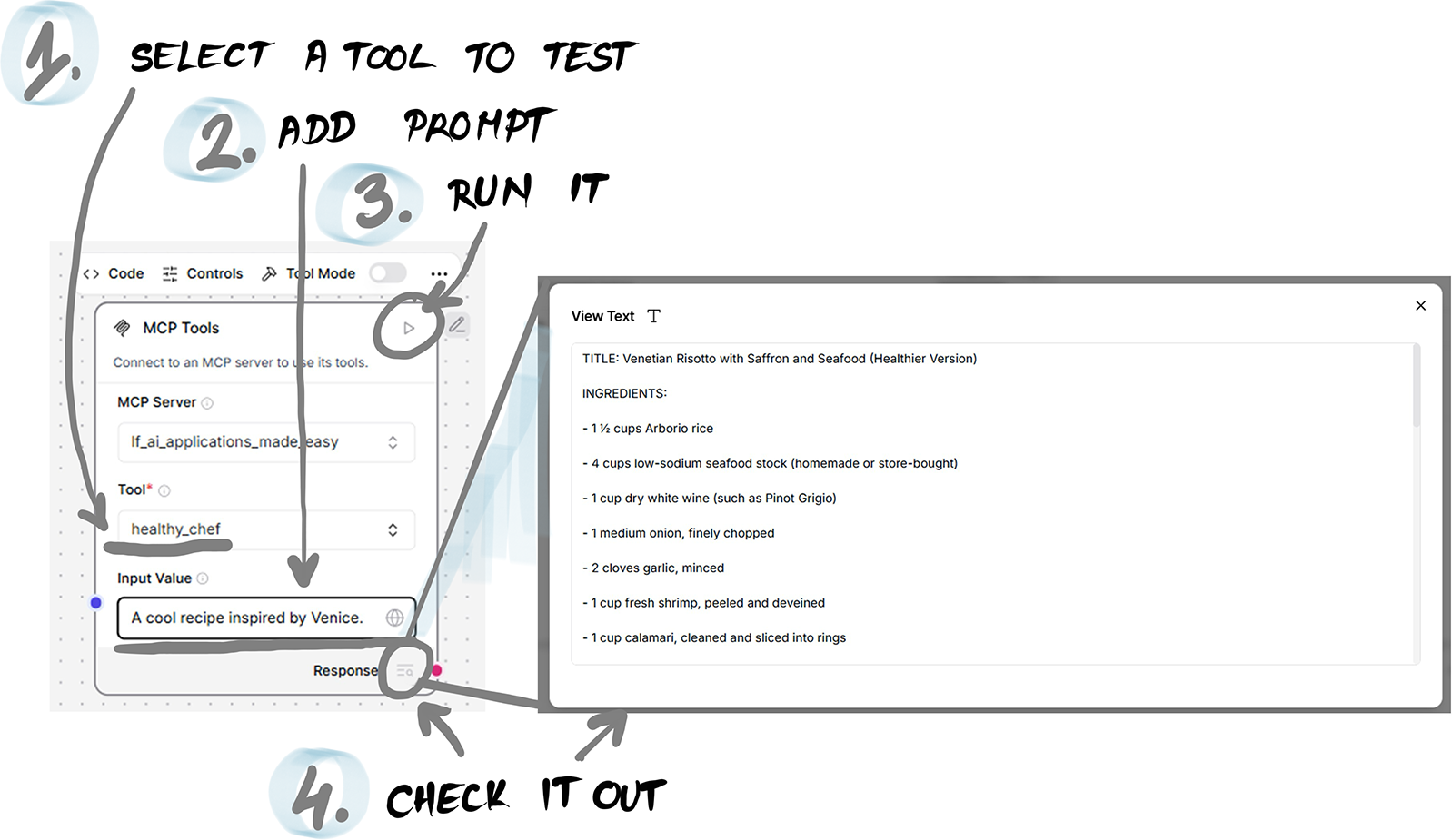
Use the figure to follow the tool-testing sequence from input prompt to response. section 8.3
