Site design plans how a website looks and feels: its layout, colors, typefaces, images, and overall presentation. A good design helps visitors feel comfortable and supports the site’s purpose, whether that is selling products, sharing recipes, or teaching a hobby. Start with the audience and goal, then make visual choices that serve both. section 1.6.6 section 1.6.7
A WordPress theme provides the starting look, but it should not be the final decision. Themes offer controls for typefaces, colors, and header images through Appearance > Customize. Choose a supported theme carefully, especially for a growing site, then customize it so the result does not look like a clone of other sites. section 1.6.6 section 1.6.7
Use this practical design process:
- Identify what visitors expect and what the site needs to accomplish. A product site should promote its offerings; a gardening site can use photos and video to highlight its subject. section 1.6.7
- Find reference sites with strong designs. Study what makes them effective, and use WPThemeDetector to identify WordPress themes and plugins when useful. section 6.9
- Choose a visual direction rather than treating “good design” as one fixed look. Warm, image-rich designs can suit boutique food sites; sleek, uncluttered designs can suit contemporary brands. section 6.9.2
- Review the whole site, not only its home page. Check navigation, consistency, oversized images, empty pages, product imagery, typography, and page clutter. section 11.2.2
- Refine individual elements so they belong. Images need relevance, appropriate placement and scale, visual harmony, and enough context to support the page’s message. section 6.9.3
Reviewing a recipe home page
Upload a home-page image to AI and ask it to compare the page with successful recipe sites. Request common strengths, differences, and specific improvements. Useful feedback can identify hard-to-read headline type, inconsistent color use, or imagery that does not show enough variety. Treat the suggestions as a review: decide which changes fit the audience and the intended mood. section 6.9
Contemporary design often favors linear forms, minimal ornament, and a restrained look, but fashion is not a substitute for fit. A stark style can be appropriate for some goals while removing visual warmth or subject matter that visitors expect. Design choices should make the site clearer and more useful, not merely more fashionable. section 7.1 section 11.2.2
Building a starting layout with Canva
For a modern recipe landing page, use the Canva GPT plugin or Canva directly to find templates. Search for terms such as “Recipes website landing page,” “minimalist,” or “contemporary,” select a promising template, resize it, and replace its text. Templates provide a fast starting point; the final choices still need to fit the site’s own purpose. section 4.3.3
Figure 6.19 GPT had several ideas about how to improve this comfy, warm version of our recipe practice site’s home page.
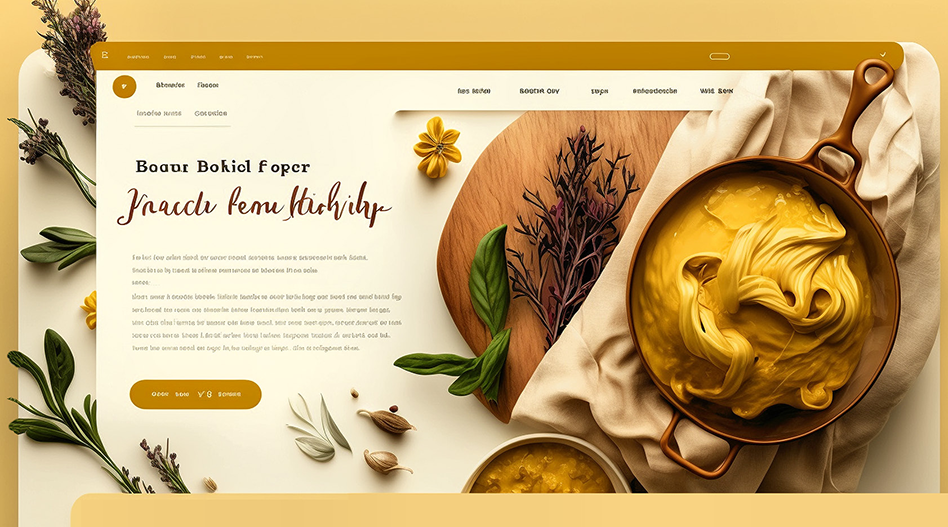
Compare the uploaded recipe home page with the AI review to see how a visual critique can turn broad design goals into concrete changes. section 6.9



