liveBook · Manning

Details element

As explained in Build a Website with ChatGPT

A details element is an HTML element that contains content that can be interactively expanded or collapsed, including an optional summary element.

A details element is an HTML container for content that visitors can expand or collapse. It includes a summary element, which acts as the visible title or description. section 5.2.1

Use the element this way:

  • Show only the summary text at first, keeping longer content out of the way. section 5.2.1
  • Let visitors click the summary or its arrow to reveal the details content, then click again to hide it. section 5.2.1
  • Place articles, headings, paragraphs, images, dates, or other content inside the details element. section 5.2.1

Online journal entry

Create each journal entry as an accordion: use the entry title as the summary, then put the date and entry text inside details. A prompt can ask ChatGPT to generate the HTML and separate CSS, which you can save as index.html and styles.css. section 5.2.3 section 5.5

Figure 5.3 Clicking the first summary element opens the accordion to display its full content.
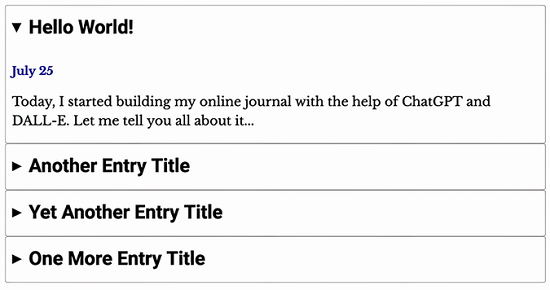
View the expanded accordion state to see how clicking a summary reveals the content contained by details. section 5.2.1

How Build a Website with ChatGPT covers it

How deep it goes
Explains the summary/details structure and click behavior, but stops short of advanced implementation internals.
Examples
Uses journal entries, four-day sample posts, entry dates, titles, text, and expanded or collapsed accordion displays.
What it assumes
Assumes no coding knowledge and teaches the required summary/details relationship through ready-to-copy prompts and files.
What you can do after
Apply it via ChatGPT by requesting accordion HTML and CSS for an online journal or another content-heavy page.
How it connects
Connects HTML with summary elements, CSS styling, and page structures such as main, header, and footer elements.

Related concepts

This explainer was generated by Manning's knowledge graph from the text of Build a Website with ChatGPT. The section links point to the parts of the book it draws on.