A directory service is a storage system for information about resources such as users and services. Connecting Airflow to one avoids maintaining a separate user database: user information is fetched from the directory during login. LDAP is the protocol commonly used to query these services. section 16.3
One account for multiple applications
A company can store an employee account once in a directory service such as Microsoft Entra ID or OpenLDAP. Airflow accesses that account through LDAP, allowing the employee to connect to multiple applications without another Airflow-specific password. section 16.3
Directory services favor high volumes of reads over frequent updates. Their data resembles a phone book: user accounts, devices, printers, and network shares are requested often but usually change less often than transactional records such as payments. Entries are organized in a hierarchical directory information tree (DIT). Each entry represents an entity, stores attributes as key-value pairs, and has a unique distinguished name (DN). section 16.3.1
LDAP provides operations for querying and managing directory entries:
- Search returns entries matching criteria, such as a user identifier. section 16.3.1
- Bind authenticates as a user after the initial anonymous connection. section 16.3.1
- Add, modify, delete, and modify DN create, edit, remove, or rename entries. section 16.3.1
- Compare checks an attribute value; abandon cancels an operation; unbind closes the connection; extended requests depend on the directory service. section 16.3.1
Searching a directory
ldapsearch -b "dc=apacheairflow,dc=com" ldapsearch -b "dc=apacheairflow,dc=com" "(uid=bsmith)" The first command searches beneath a domain-based directory root; the second narrows the search to the entry whose uid is bsmith. section 16.3.1
Figure 16.9 Information in a directory service is stored in a hierarchical structure named DIT. Entries represent an entity such as a person and hold key-value attributes about the entity.
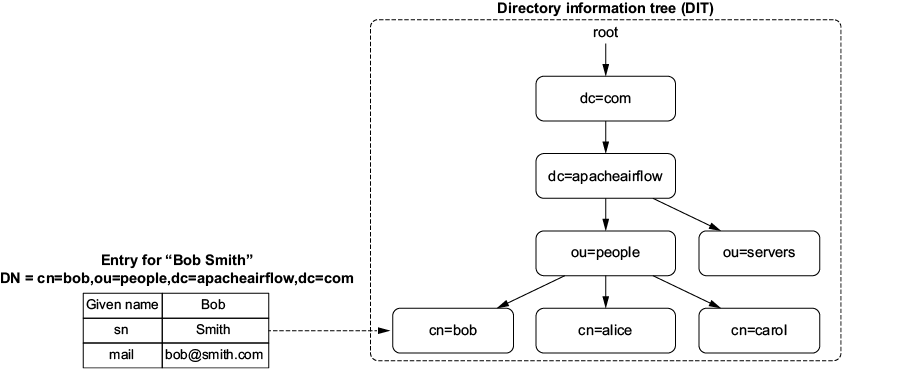
Use the directory tree illustration to inspect how hierarchical entries represent entities and their attributes. section 16.3.1
Table 16.2 Overview of LDAP operations
| LDAP operation |
Description |
|
|
Aborts a previously requested operation |
|
|
Creates a new entry |
|
|
Authenticates as a given user. Technically, the first connection to a directory service is anonymous. Then the bind operation changes the identity to a given user, which allows you to perform certain operations on the directory service. |
|
|
Checks whether a given entry contains a given attribute value |
|
|
Removes an entry |
|
|
Requests an operation that isn’t defined by the LDAP standard but is available on the directory service (depending on the type of directory service you’re connecting to) |
|
|
Changes the DN of an entry |
|
|
Edits attributes of an entry |
|
|
Searches and returns entries that match given criteria |
|
|
Closes the connection to a directory service |
Use the LDAP operations table as a compact reference for authentication, searching, entry changes, and connection management. section 16.3.1
