Disaster recovery (DR) is the capability to recover a database after a critical incident: corruption, server loss, or loss of an entire data center or cloud availability zone. Backup and restore is the most basic DR approach. Critical applications may instead need synchronized redundant hardware in another geographical location—a warm standby—to reduce recovery time. section 13.1
Do not confuse DR with high availability (HA). HA automatically fails a database over after a production-server problem, typically to nearby hot-standby infrastructure. DR is designed for broader incidents, especially site loss, and commonly requires manual failover across geographically separated sites. A local HA design can remove server, rack, and switch failures without providing rapid recovery from a data-center outage. section 13.1 section 13.6
Figure 13.3 HA/DR topology using availability groups providing local automatic failover and cross- site manual failover
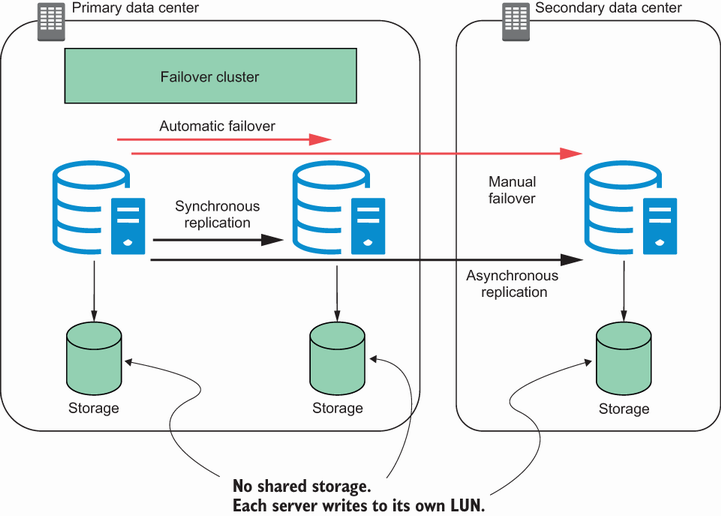
Compare a combined topology: local replicas support automatic HA failover, while a separate site supports manual DR failover when the primary location is lost. section 13.1
Treat a DR plan as an operational capability, not merely synchronized data:
- Base the design on business requirements and the cost of downtime; redundant infrastructure should not cost more than the downtime it avoids. section 13.6
- Test failover regularly. Synchronization alone does not prove that recovery will work. section 13.3 section 13.6
- Include users in tests to verify that the recovered site provides acceptable performance. section 13.3 section 13.6
- Capacity-plan secondary infrastructure and avoid overloaded clusters, which can extend downtime during an incident. section 13.6
A failover that succeeds but does not restore service
A database can fail over to a secondary replica in another data center and still leave users unable to work. Network latency or an underspecified secondary server may make performance unacceptable. Other failures can block failover altogether: the SYSTEM account may lack required availability-group permissions, or forced protocol encryption may prevent health monitoring from connecting locally. Controlled DR tests expose these conditions before an actual emergency. section 13.3
Availability groups can support HA, DR, or both, but they are not automatically the right answer. Consider the workload and recovery need: very high write volumes and large data warehouses may not suit availability groups, while failover clustering or other technologies can be appropriate for particular cases. section 13.0 section 13.6






