liveBook · Manning

Distributed file system

As explained in Learn Docker in a Month of Lunches, Second Edition

A distributed filesystem stores or exposes data across networked machines while presenting filesystem access to clients.

A distributed file system exposes data from networked machines through filesystem-like access. SMB and NFS shares, Azure Files, and Amazon S3 are examples of distributed storage that can be mounted into a container. section 6.4

A mount may look like a normal filesystem without supporting every operation an application expects. Compatibility depends on the storage system and the application’s filesystem behavior. section 6.4

Azure Files and Postgres

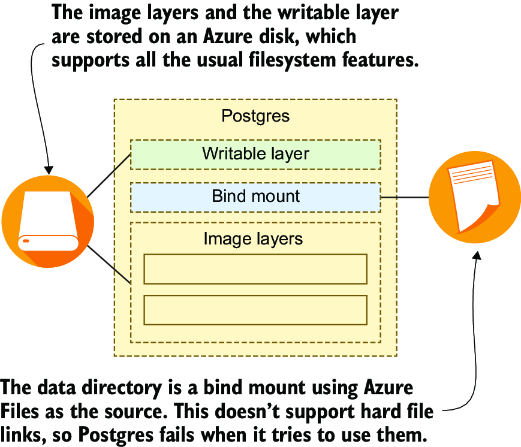
A Postgres container using Azure Files can read and write normally but crash when it creates a file link, because Azure Files does not support that operation. section 6.4

Figure 6.14 Distributed storage systems may not provide all the usual filesystem features.
figure

Use the figure to inspect how distributed storage may omit filesystem features that containerized applications require. section 6.4

How Learn Docker in a Month of Lunches, Second Edition covers it

How deep it goes
Defines distributed filesystems and demonstrates one compatibility failure, but stops short of a reproducible distributed-storage exercise.
Examples
Uses SMB, NFS, Azure Files, Amazon S3, and a Postgres container that fails to create a file link.
What you can do after
Diagnose storage compatibility failures by testing whether a mounted system supports the operations an application expects.
How it connects
Connects distributed filesystems with containers, bind mounts, filesystem operations, and cloud storage.

Related concepts

This explainer was generated by Manning's knowledge graph from the text of Learn Docker in a Month of Lunches, Second Edition. The section links point to the parts of the book it draws on.