How can a photograph show gray when the available materials are only black ink and white paper? Dithering answers by arranging discrete black and white marks so their density suggests an intermediate tone. It connects older printing practices with computer-controlled image reproduction. section 8.0
A simple ordered dither works like this:
- Divide an image into small squares of pixels, such as 2 × 2 or 4 × 4. section 8.3
- Choose a black-and-white pattern for each square according to its average gray level. section 8.3
- Generate ordered patterns from a table that specifies when each pixel turns black. section 8.3
- Balance shade against apparent resolution: a 2 × 2 scheme offers five gray levels, while a 4 × 4 scheme offers seventeen but produces fewer dots overall. section 8.3
A growing spot
In a 4 × 4 pattern, black marks grow gradually as the tone moves from white to black. The remaining white corners form spots of their own, helping the transition appear smooth. A camel image can look more convincing when viewed from across a room than under close inspection, where the repeated pattern becomes visible. section 8.3
Figure 8.21 Patterns for a 4 x 4 halftone
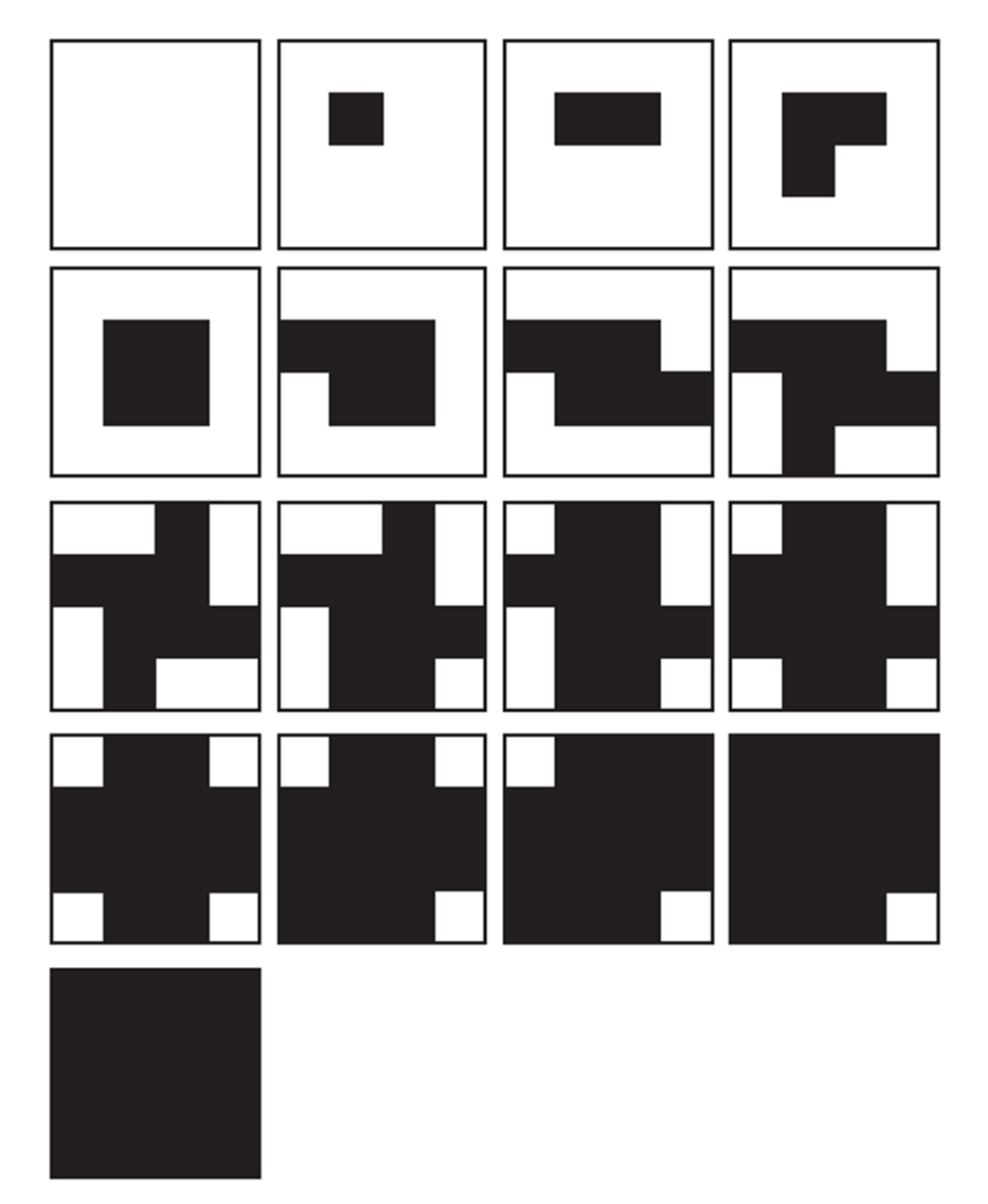
Compare the 4 × 4 pattern grid with the resulting family of dither patterns. section 8.3
