docker build packages application code and assets into a ready-to-run Docker image by following instructions in a Dockerfile. Run it from the project directory and end the command with . so the current directory supplies the build context. section 3.8.2 section 3.12
Build a microservice image
cd chapter-3/example-1 docker build -t video-streaming --file Dockerfile . The command downloads uncached base-image layers, then reports the image ID and tag. Inspect the result with docker image list; the example produces a video-streaming:latest image. section 3.8.2
Use the command options to control the build:
- -t assigns a meaningful image name and tag, avoiding reliance on the generated image ID. section 3.8.2
- --file selects the Dockerfile used for the build. section 3.10
- The final . supplies the current directory as the build context; omitting it is a common mistake. section 3.8.2 section 6.11.2
- Use versioned tags such as video-streaming:1 for deployments, incrementing the number for later builds. section 6.8.1
Figure 3.19 A complete Docker build pipeline showing where build, push, and run fit within the process
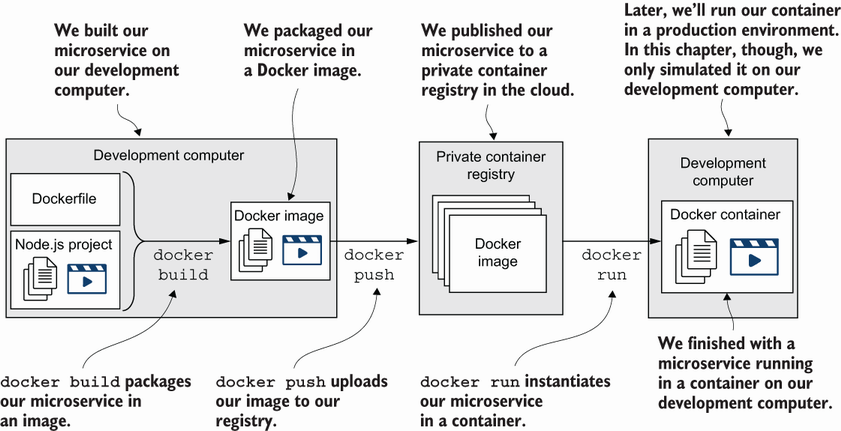
Follow the complete pipeline from building an image through tagging, registry authentication, publishing, and running it. section 3.10



