liveBook · Manning

Docker CLI

As explained in Learn Docker in a Month of Lunches, Second Edition

Docker CLI is the command-line interface for interacting with Docker.

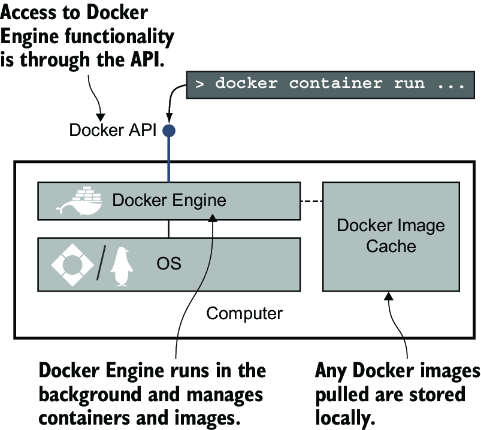
Docker CLI is the command-line client for Docker’s HTTP-based API. It sends requests to the Docker Engine, which manages images, containers, networks, and other Docker resources. section 2.5

Use the CLI to:

  • Manage containers on the local computer or on a remote Docker host. section 2.5
  • Execute Dockerfile steps for packaging application components. section 11.0
  • Start and stop application stacks described by Docker Compose files. section 11.0
  • Run scripted Docker workflows inside automation and continuous-integration jobs. section 11.0
Figure 2.7 The Docker components
figure

The Docker components diagram clarifies the CLI–API–Engine relationship behind every command. section 2.5


How Learn Docker in a Month of Lunches, Second Edition covers it

How deep it goes
Explains the CLI–API–Engine architecture and remote control, but stops short of deeper containerd implementation details.
Examples
Uses local and remote container management, Dockerfile packaging, Compose stack control, and scripted CI jobs.
What it assumes
Assumes basic Docker resources and files while introducing the CLI, API, Engine relationship from first principles.
What you can do after
Operate/configure Docker workflows locally, remotely, and within automated build and test processes.
How it connects
Ties Docker CLI to Docker API, Docker Engine, containers, images, Dockerfile, Docker Compose, and continuous integration.

Also explained in

Compare how 3 books explain Docker CLI →

Related concepts

This explainer was generated by Manning's knowledge graph from the text of Learn Docker in a Month of Lunches, Second Edition. The section links point to the parts of the book it draws on.
