liveBook · Manning

Docker Desktop

As explained in .NET in Action, Second Edition

Docker Desktop is a desktop application that provides Docker container development and runtime capabilities on supported operating systems.

Docker Desktop provides a local interface for building, inspecting, and running containers during .NET development, particularly on Windows and macOS. It complements .NET 7 and later container support and remains useful for local hosting. section 13.2

Use Docker Desktop to:

  • Build images from a Dockerfile and register them with Docker. section 13.3.1
  • Inspect images, layers, tags, and dangling images after rebuilding. section 13.3.1
  • Start containers with port mappings and environment variables such as DOTNET_ENVIRONMENT or Level1__Level2. section 13.4.4 section 13.3.1
Figure 13.5 Docker Desktop starting a container with optional environment-variable settings, including DOTNET_ENVIRONMENT set to Prod1
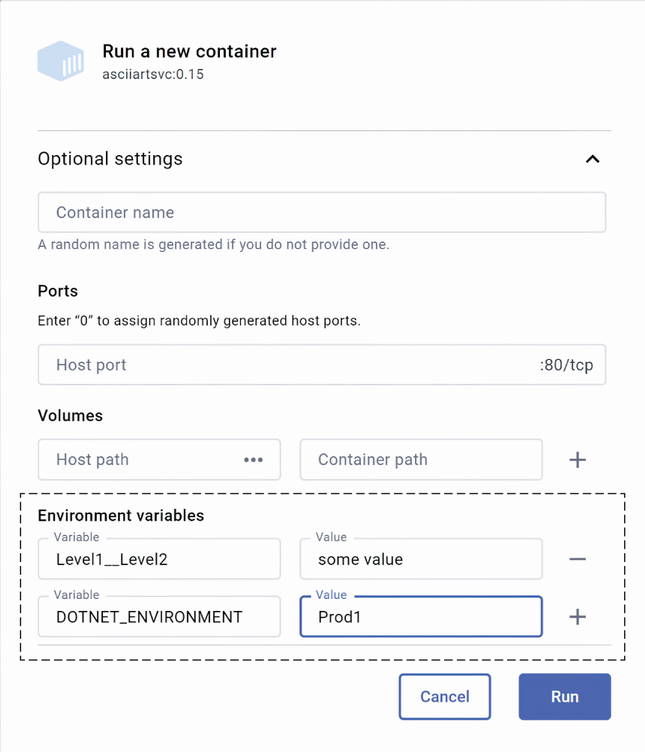
Use the startup view to set DOTNET_ENVIRONMENT and other configuration values before running a container. section 13.4.4


How .NET in Action, Second Edition covers it

How deep it goes
Explains practical image and container operations, including Dockerfile builds, tags, layers, ports, and environment variables.
Examples
Uses the AsciiArtSvc image, Dockerfiles, .dockerignore, port mappings, tags, layers, and DOTNET_ENVIRONMENT settings.
What it assumes
Assumes a .NET project and Dockerfile, while introducing Docker Desktop installation and command-line image-building workflows.
What you can do after
Operate/configure local .NET containers by building images, applying tags, mapping ports, and setting runtime configuration.
How it connects
Connects Docker Desktop with containers, Dockerfiles, Docker images, environment variables, .NET, and Kubernetes-based production hosting.

Also explained in

Compare how 3 books explain Docker Desktop →

Related concepts

This explainer was generated by Manning's knowledge graph from the text of .NET in Action, Second Edition. The section links point to the parts of the book it draws on.
