Docker Desktop is a desktop application that packages Docker components and provides a local environment for running containers on macOS or Windows. It sets up a Linux virtual machine containing the Docker daemon and containers, while the Docker CLI remains available on the host operating system. section 2.1.3 section 3.1.1
Use Docker Desktop to:
- Install a container runtime without manually configuring a Linux virtual machine. section 2.1.3
- Run containers through the host-installed docker command-line tool. section 2.1.3
- Enable a single-node Kubernetes cluster from the Settings dialog for local exploration. section 3.1.1
- Choose Linux containers on Docker Desktop for Windows when following Linux-based container examples. section 2.1.3
Run a first container
After installing Docker Desktop, run `docker run busybox echo "Hello World"`. Docker pulls the busybox image when it is not already local, starts a container, and prints `Hello World`. The same environment can run versioned images such as `redis:7.4.1-alpine`. section 2.1.3
$ docker run busybox echo "Hello World"
Unable to find image 'busybox:latest' locally          #1
latest: Pulling from library/busybox                   #1
7c9d20b9b6cd: Pull complete                            #1
Digest: sha256:fe301db49df08c384001ed752dff6d52b4...   #1
Status: Downloaded newer image for busybox:latest      #1
Hello World         #2
Inspect the command output to see image retrieval, download completion, and the container's printed result. section 2.1.3
Figure 3.2 Kubernetes running in Docker Desktop
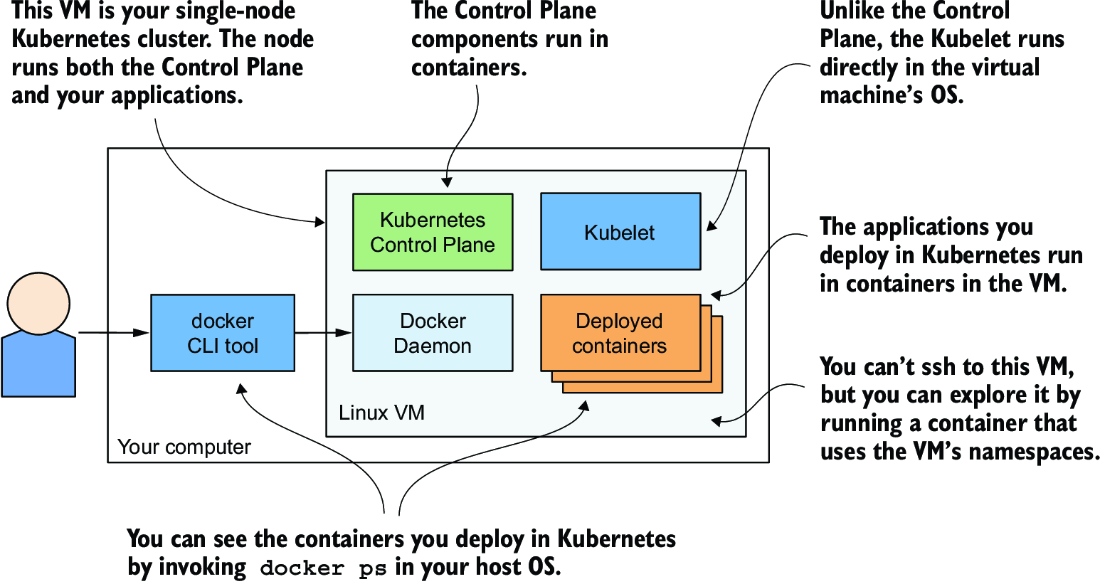
Visualize how Docker Desktop hosts the virtual machine, Kubernetes components, and deployed application containers. section 3.1.1


