liveBook · Manning

Virtual network

As explained in Google Anthos in Action

An Azure virtual network is an isolated virtual network in Microsoft Azure that provides connectivity for cloud resources.

An Azure virtual network is a required networking resource when deploying GKE clusters through Anthos on Azure. It forms part of the Azure-side foundation alongside an Azure Active Directory application and a resource group. section 5.6

Plan the virtual network as part of the wider cluster deployment:

  • Create the virtual network before deploying the clusters. section 5.6
  • Prepare the required Azure identity and permissions, including an Azure Active Directory application and the Application administrator, User access administrator, and Contributor roles. section 5.6
  • Use the Azure-native network alongside Azure Load Balancer and Azure Virtual Machines while Anthos manages GKE cluster life-cycle operations through its multicloud API. section 5.6
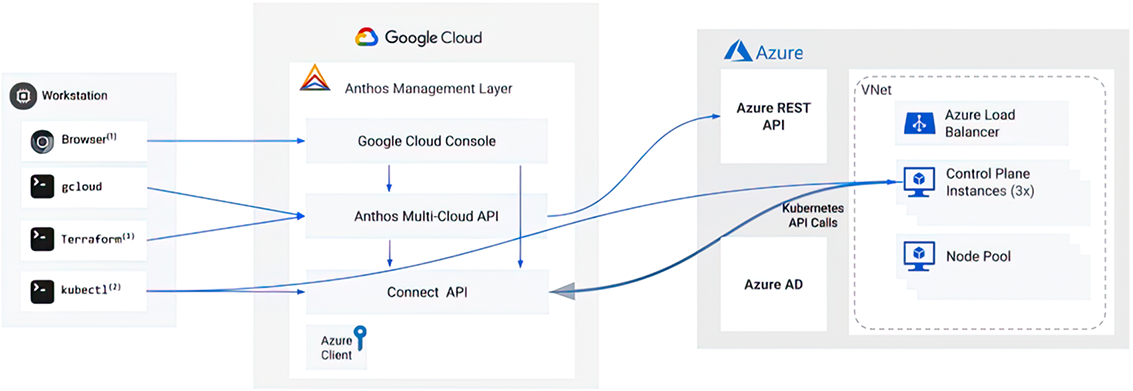
Figure 5.20 Anthos on Azure architecture
05-20

Use the Anthos on Azure architecture to locate the virtual network within the cluster deployment design. section 5.6


How Google Anthos in Action covers it

How deep it goes
Identifies the deployment prerequisite and surrounding permissions but does not specify address ranges, subnets, routing, or configuration steps.
Examples
Uses the Anthos on Azure architecture as the concrete deployment example.
What it assumes
Assumes Azure deployment administration and requires gcloud CLI installation plus specified Azure roles and an Azure Active Directory application.
What you can do after
Operate/configure the Azure networking prerequisite within an Anthos on Azure cluster deployment.
How it connects
Connects virtual networks with Anthos, GKE clusters, Azure Active Directory, resource groups, Azure Load Balancer, and Azure Virtual Machines.

Also explained in

Compare how 4 books explain virtual network →

Related concepts

This explainer was generated by Manning's knowledge graph from the text of Google Anthos in Action. The section links point to the parts of the book it draws on.

