A document database stores data in flexible JSON-like documents. Think of each document as a bin: instead of fetching a customer’s profile, addresses, and orders from separate tables, you can keep related information together in one nested record. section 8.2.2
Figure 8.3 Showing how NoSQL Document databases store data. Instead of splitting a customer and their orders across separate tables linked by Foreign Keys, all related information is nested into a single, self-contained document. When the application asks for Alice's profile, the database returns her orders at the exact same time; no expensive "Joins" required!
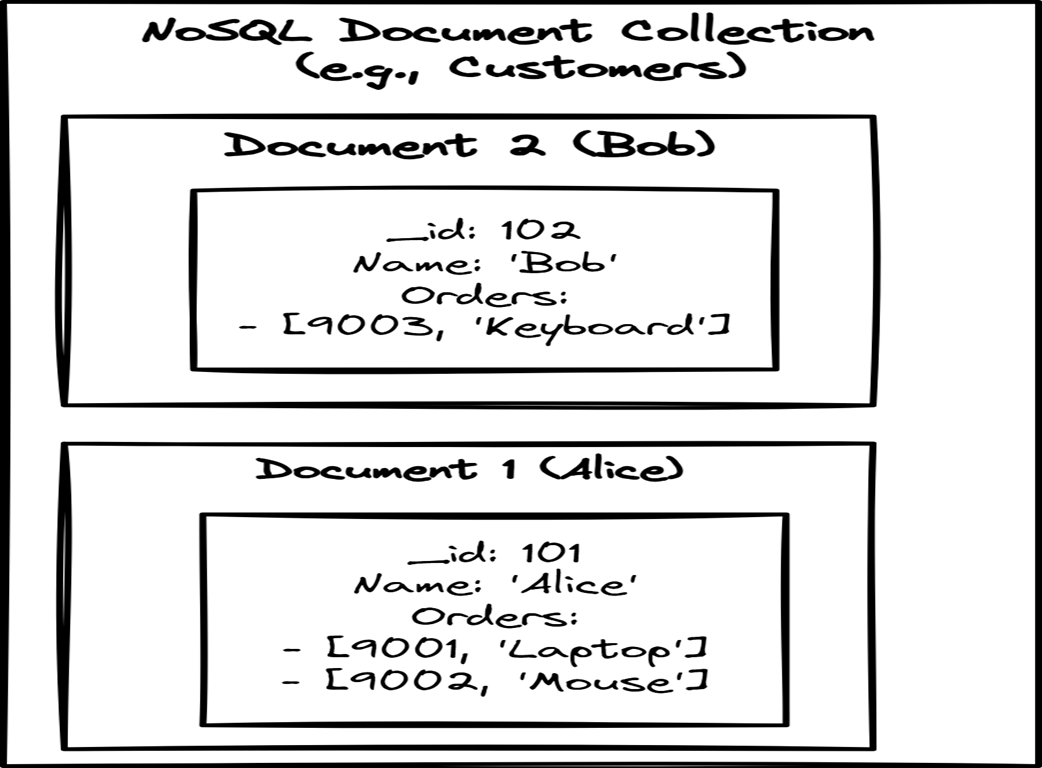
See how a customer document nests orders so a profile can be retrieved without joining separate tables. section 8.2.2
This layout suits data with varying attributes and can make it convenient to read a whole aggregate at once. The tradeoff is that changing a particular piece of information across many documents can mean opening and updating many separate bins. Choose the shape around how the application needs to read and change its data. section 8.2.2
Listing 8.2 The NoSQL Way (MongoDB)
// INSERT: Nested JSON
db.recipes.insertOne({
  name: "Lasagna",
  tags: ["pasta", "cheese", "italian", "dinner"]
});

// QUERY: Contains Match
db.recipes.find({ tags: "pasta" }); #A
In this MongoDB example, a recipe document contains an array of tags; a query finds recipes with the tag “pasta.” section 8.2.4
Document stores are one kind of NoSQL database, not a universal replacement for relational databases. MongoDB and CosmosDB are examples; relational tables may be a better fit when complex relationships and strict integrity are central to the job. section 8.1 section 8.2.2