dotnet build compiles a .NET project from its project folder. When compilation succeeds, it creates build artifacts in the bin folder, including the application’s .dll file. section 3.2.2 section 27.1.1
Use dotnet build as part of the normal .NET CLI workflow:
- Run it inside the project folder to compile that project. section 3.2.2
- Expect package restoration to happen implicitly unless automatic restoration is disabled. section 3.2.2
- Use dotnet run afterward to execute the built application; use dotnet publish when deployment packaging is required. section 27.1.1
Compile a project
From the project directory, run dotnet build. A successful build places the compiled application, such as ExampleApp.dll, under bin. On Windows, an accompanying .exe wrapper may also appear. section 3.2.2 section 27.1.1
The dotnet build command runs dotnet restore implicitly. Similarly, dotnet run runs dotnet build and dotnet restore. If you don’t want to run the previous steps automatically, you can use the --no-restore and --no-build flags, as in dotnet build --no-restore.
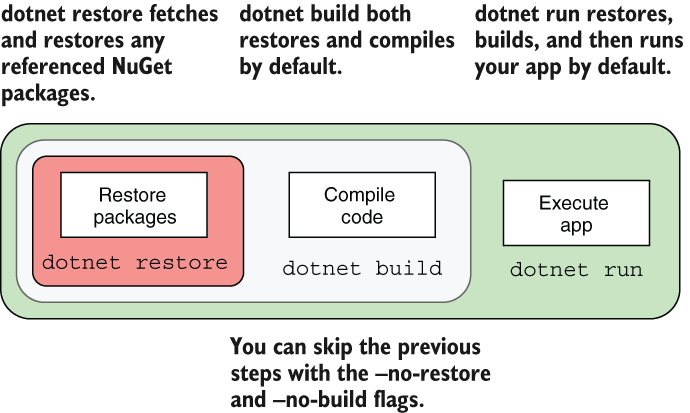
Compare the implicit restore and build steps with --no-restore and --no-build options. section 3.2.2
