dotnet ef migrations add compares the current Entity Framework Core model with its previous snapshot and generates a migration for schema changes. It keeps entity definitions, EF Core’s internal model, and the database schema aligned. section 12.6
Use the command after changing entities:
- Change the entity model, such as adding IsVegetarian and IsVegan to Recipe. section 12.3.2
- Run dotnet ef migrations add ExtraRecipeFields in the project folder. section 12.3.2
- Review the generated migration, its designer snapshot, and the updated AppDbContextModelSnapshot.cs. section 12.3.2
- Apply the pending migration separately with dotnet ef database update; creating the migration alone does not change the database. section 12.6 section 12.3.2
Adding recipe flags
After adding IsVegetarian and IsVegan to Recipe, run dotnet ef migrations add ExtraRecipeFields. EF Core creates the migration files; dotnet ef database update then adds the fields to the Recipes table. section 12.3.2
Figure 12.8 Creating a second migration and applying it to the database using the command-line tools
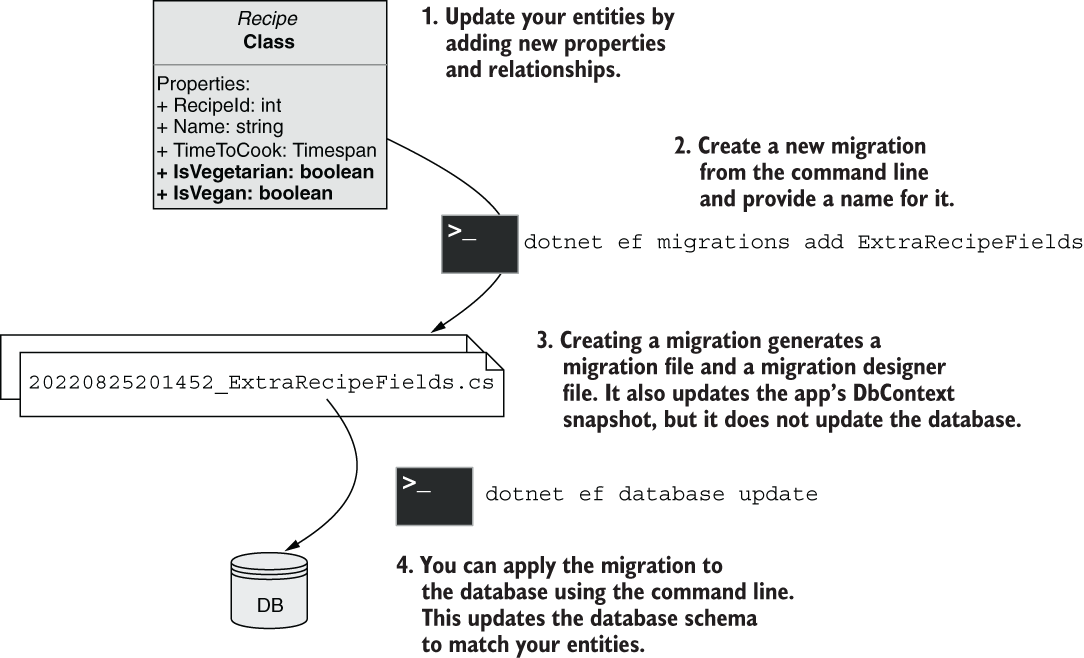
Follow the command-line workflow from changing the entity to creating and applying the migration. section 12.3.2
