An action script performs the substantive work that a watcher detects: moving a file, creating a site, or completing another request. Keep the watcher focused on quick polling and hand off each qualifying item to an action script so monitoring can continue without waiting for the work to finish. section 3.3 section 3.5
Design the handoff around independent, repeatable work:
- Let the watcher identify the condition, mark or otherwise preserve progress, and launch an action for the individual item. section 3.3.1 section 11.3.2
- Launch PowerShell action scripts with Start-Process so each runs in a separate process; the watcher and action are insulated from each other's failures or termination. section 3.3.2
- Pass primitive values such as strings, integers, and Booleans rather than PowerShell objects; pass a file's full path rather than its Get-ChildItem object. section 3.3.2
- Limit concurrent processes when bursts are possible. Use -PassThru to retain process IDs and count still-running actions before starting more. section 3.3.2
- Give each action its own unattended-script safeguards, error handling, and logging because the watcher cannot report errors from an independent process. section 3.3.5
Move newly arrived files without blocking the monitor
A folder watcher runs every minute, finds new files, and starts an action script for each one. The action checks whether the destination name already exists, compares file details when needed, moves or renames the file, and records success or failure. Parallel actions shorten processing time, while duplicate handling avoids overwriting or repeatedly skipping files. section 3.3 section 3.3.1 section 3.3.5
Figure 3.9 File watcher execution with the file actions of checking names and hashes is moved into an action script that runs in a separate process.
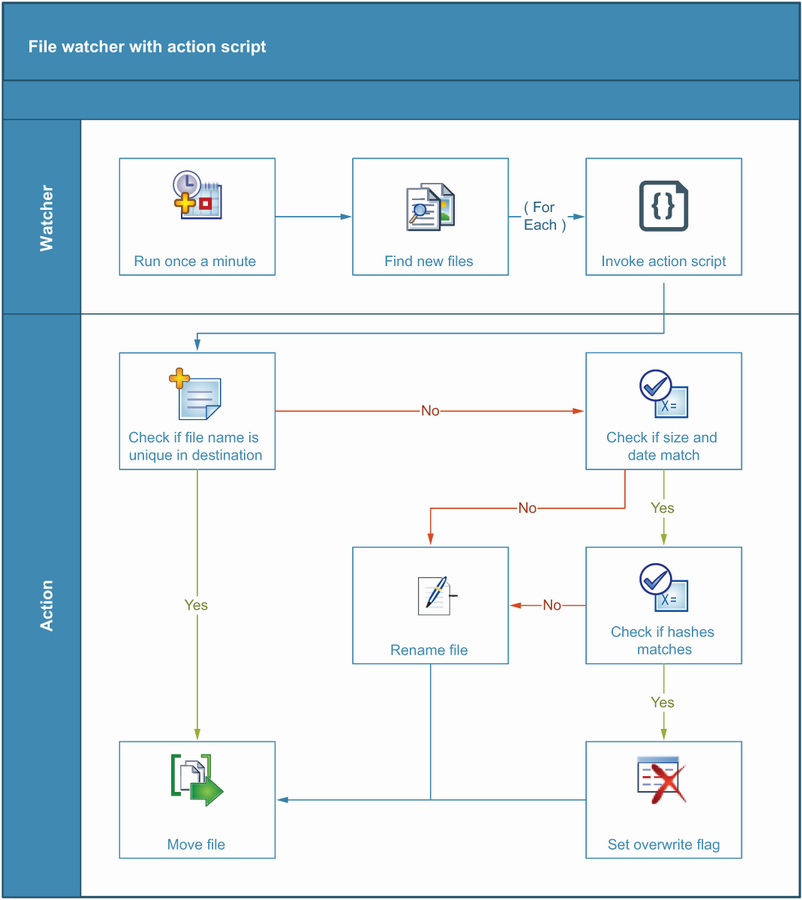
Use the workflow diagram to separate the fast folder check from the slower name, hash, and move operations performed by the independent action process. section 3.3.1
Process SharePoint site requests by ID
A watcher queries a SharePoint list for Submitted requests, changes each status to Creating, and starts an action script to create the site. Passing only the list-item ID lets the action retrieve its own request data and can reduce watcher changes when request fields evolve. section 11.3.2
Validate the whole automation as two independently runnable components. Both scripts need access to the action path and required resources, and watcher frequency must leave room to avoid overlapping executions or support graceful exit and recovery when overlap is possible. section 3.3.1 section 3.4
