A building block is a small, reusable automation capability. Breaking a complex task into blocks turns an overwhelming system of logic, systems, and changing requirements into clear goals that can be completed and used incrementally. section 1.3 section 1.3.1
In PowerShell, a building block maps to a function. Give each function one action, so it can be restarted when a failure occurs; place functions in modules so people and other automations can reuse them. section 2.3
Design blocks around distinct operations rather than a whole workflow:
- Identify the inputs and parameters required for the operation. section 2.1
- Keep an operation narrow enough to reuse in another phase or automation. section 1.3.1
- Make a block restartable by having it perform only one action. section 2.3
- Improve a shared block once and carry the improvement into prior automations that use it. section 1.3.1
Virtual-machine provisioning
Provisioning can proceed in phases: create the virtual machine, install its operating system, and configure the operating system. The creation phase can use separate blocks to select a host, allocate CPU and memory, attach a network interface, and create virtual disks. A subnet-attachment block built during creation can be reused to move the machine to an operating-system deployment subnet and later to a production subnet. section 1.3.3
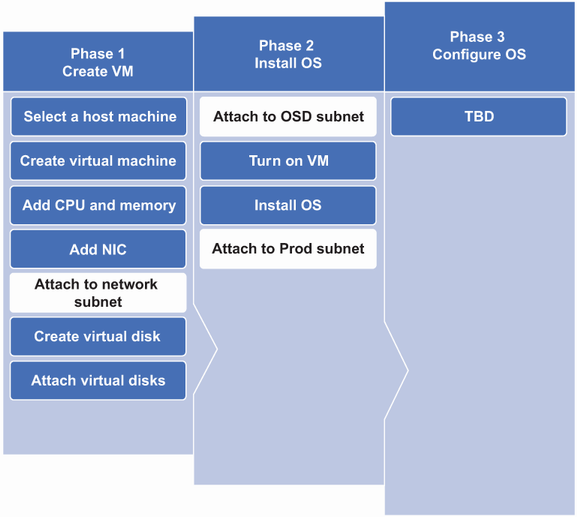
This phased provisioning view highlights components shared between virtual-machine creation and operating-system installation. section 1.3.3
Log-file cleanup
A file-cleanup automation can be designed from blocks that find files eligible for archiving, create an archive, and remove archived files. Parameters for the log folder, archive location, archive name, and age threshold make the capability adaptable beyond one run. section 2.1
