liveBook · Manning

Dropdown

As explained in ASP.NET Core in Action, 3e

A select element is an HTML form control that presents one or more options for user selection.

A <select> form control lets users choose from a list of options, such as a currency to convert. In Razor, the Select Tag Helper connects the control to PageModel properties for its options and selected value. section 18.2.4

Choose the form that fits the interaction:

  • Use a standard dropdown for one selection, a list box with the size attribute to show several options, or an IEnumerable-bound property for multiple selections. section 18.2.4
  • Supply options as SelectListItem values through asp-items, and bind the selected value with asp-for. Add a blank option when you do not want an item selected by default. section 18.2.4

Render a dropdown

Set Model.Items to a list of SelectListItem options, then use <select asp-for="Input.SelectedValue1" asp-items="Model.Items"></select> in Razor. section 18.2.4
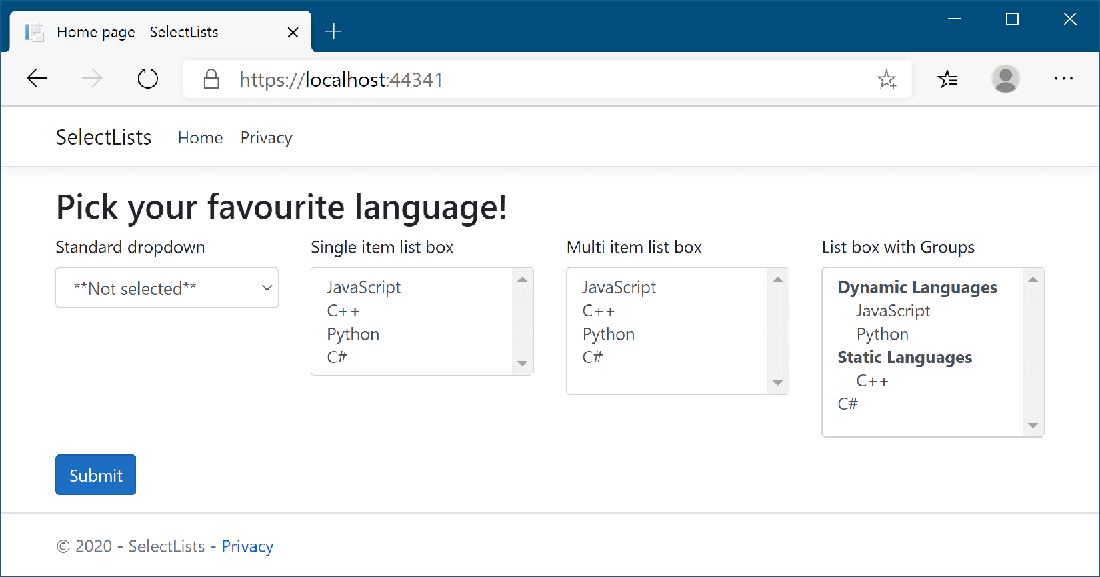
Figure 18.6 Some of the many ways to display <select> elements using the Select Tag Helper.
CH18_F06_Lock3

Compare dropdowns, list boxes, multiselect controls, and grouped options. section 18.2.4

How ASP.NET Core in Action, 3e covers it

How deep it goes
Explains option and selection properties, Tag Helper bindings, display variations, and blank options.
Examples
Demonstrates currency selection, language options, list boxes, multiselect, grouped options, and a blank option.
What you can do after
Apply the Select Tag Helper to render dropdowns, list boxes, multiselect controls, and grouped options.
How it connects
Connects HTML forms with Razor, model binding, PageModel properties, and the Select Tag Helper.

Also explained in

Compare how 10 books explain dropdown →

Related concepts

This explainer was generated by Manning's knowledge graph from the text of ASP.NET Core in Action, 3e. The section links point to the parts of the book it draws on.