A DSL editor is an interactive projection of domain-specific language content. Rather than editing raw characters, domain experts manipulate rendered language elements through operations that reflect the allowed structure. Fixed wording and punctuation can be rendered automatically, while editable parts expose only meaningful choices. section 1.2.1 section 1.5
This guidance makes invalid input harder to create. An editor can limit condition positions to condition constructs, require an action after a rule’s result clause, offer a fixed set of values such as weekdays, and report errors for unsuitable values. Constraints warn when content would cause trouble for code generation or the generated Runtime. section 1.2.1 section 1.5
A projection becomes a DSL editor when it supports focused changes to AST-backed content:
- Change a simple setting containing text, a number, or a value selected from a fixed set. section 5.5
- Change the target of a setting that represents a reference relation. section 5.5
- Track the active edit through edit state, identifying the setting, property, and AST object being changed. section 5.5
- Re-render the projection automatically after an AST change through a reactive architecture. section 5.5
Editing a rental discount rule
A rental rule can express a discount for a date range containing a Saturday and starting in December. The editor renders the rule as a readable sentence, supplies a drop-down for selecting the weekday, limits condition edits to applicable constructs, and flags an attempt to use “peanuts” as a discount value. section 1.2.1
The DSL editor is the primary frontend capability of a Domain IDE. Domain experts use it to author precise specifications; a backend can store that content and generate and build a Runtime from it. By reducing manual translation by software developers, the editor supports quicker domain-driven changes and testing. section 1.3.1 section 1.5
Figure 1.8 The same two business rules, shown inside the Domain IDE editor
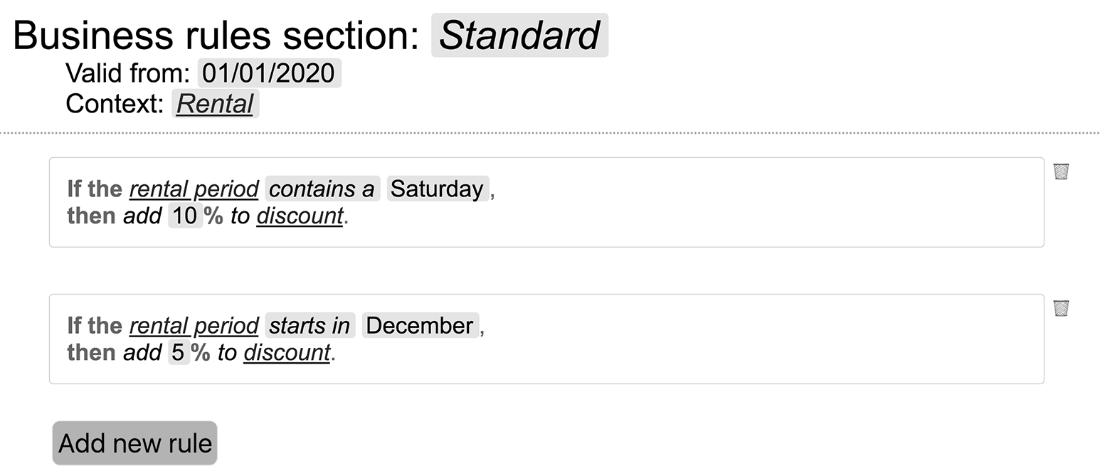
Inspect the editor view to see business rules presented as structured, editable DSL content inside the wider Domain IDE. section 1.2.1
