Easing controls an animation’s pace rather than its destination. Instead of changing at a constant rate, an easing function remaps progress over time so motion can accelerate, decelerate, or do both. That change in pacing makes a menu, dialog, fade, or moving title feel less mechanical and abrupt. section 11.2.3 section 12.1.1
Think of animation progress as a value from 0 to 1. Linear motion leaves that value unchanged, so equal amounts of time produce equal amounts of change. An easing curve transforms it: steep parts produce faster movement, shallow parts slower movement. The curve’s shape therefore determines where an animation spends most of its time. section 11.5 section 12.1.3
CSS provides five cubic-Bézier-based timing keywords for common motion patterns:
- linear keeps a constant rate of change; it can feel mechanical because it has no acceleration or deceleration. section 11.2.3
- ease starts gently, reaches its highest speed near the middle, and slows gradually at the end. section 11.2.3
- ease-in puts most of the change near the end, creating a slow start and rapid acceleration. section 11.2.3
- ease-out changes quickly at first and then levels off, making it useful when arriving at a resting position. section 11.2.3
- ease-in-out combines a gradual start with a gradual finish; CSS represents it as cubic-bezier(0.42, 0, 0.58, 1). section 11.2.3
Figure 11.6 The cubic Bézier curve defined by the linear keyword or cubic -bezier(0, 0, 1, 1)
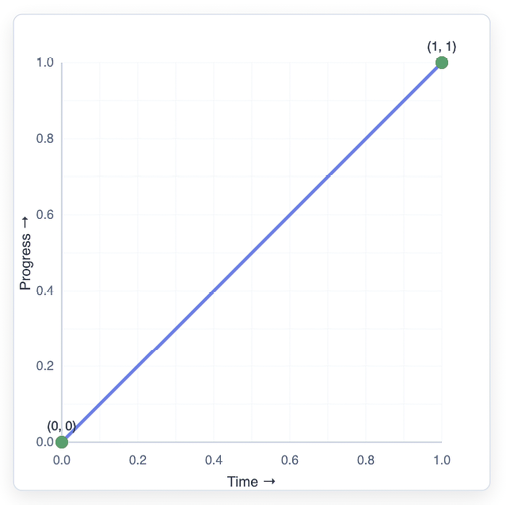
Compare the straight linear curve with curved timing functions: the line directly represents constant progress, while curved paths redistribute speed across the animation. section 11.2.3
For CSS transitions and animations, use a timing keyword when its motion fits the interaction, or use cubic-bezier() to specify a custom curve. The first control point influences the beginning: its x value affects when initial acceleration occurs and its y value affects how much. The second point similarly controls when deceleration begins and how much occurs near the end. Values below 0 can create anticipation; values above 1 can create overshoot. section 11.3 section 11.5
Ease a JavaScript animation before interpolating
A JavaScript animation can calculate raw progress as elapsed / duration, pass it to an easing function, then interpolate with the returned value. For an ease-out cubic curve, use eased = 1 - Math.pow(1 - progress, 3), then calculate currentTop = start + eased * distance. A dialog moving down from offscreen slows as it approaches its final position instead of stopping abruptly. section 12.1.1 section 12.1.3
CSS easing is well suited to many ordinary transitions, including custom cubic-bezier() curves. JavaScript is useful when timing must react to input, data changes, or more complex logic: it gives direct control over the progress transformation and the interpolated property value. Easing can shape positions, opacity, colors, and other numeric values. section 12.1.3 section 1.3.1

