An element box is the invisible rectangular area surrounding an HTML element. Its four parts are content, padding, border, and margin—the CSS box model. section 4.2.3
The box separates an element from its content and surroundings:
- Content holds text or images. section 4.2.3
- Padding adds space between the content and border. section 4.2.3
- Border surrounds the content and padding with lines. section 4.2.3
- Margin adds space outside the border. section 4.2.3
A simple box adjustment
To give a navigation element a visible outline, use: nav { border: 1px solid black; }. To add equal space around a header, use: header { padding: 10px; }.
Figure 4.4 The main parts of an element box
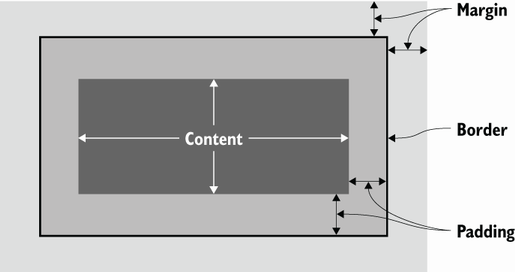
Use the diagram to see how content, padding, border, and margin fit together. section 4.2.3

