Every HTML element sits inside an invisible rectangle. CSS lets you control that rectangle’s size, spacing, borders, and position—an idea that makes page layout much less mysterious. section 9.1
Figure 9.1 The main parts of an element box
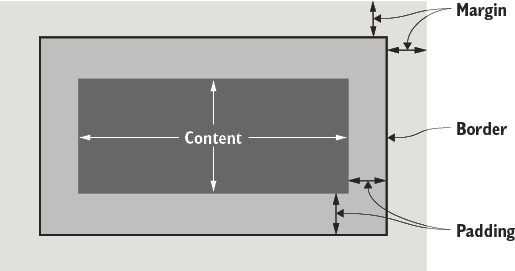
Use the diagram to see the element box from the inside out: content, padding, border, and margin. section 9.1
The box has four main parts:
- Content holds text, images, or other material. section 9.1
- Padding adds breathing room between the content and border. section 9.3
- Border surrounds the content and padding with lines. section 9.1
- Margin adds space outside the border, separating the element from nearby elements. section 9.7
Browsers calculate block-level boxes automatically: width usually follows the container, while height grows to fit the content. Set width and height when you need control, but let text create its own height whenever possible. section 9.2
Give a navigation menu room to breathe
Turning list items into inline blocks keeps them in a row. Adding padding separates labels such as Home, Research Papers, Blog, and Contact Info so they do not run together. section 9.3

